
6 Best AI CRM for Small Businesses in 2026: Comparison List


The best AI CRM for a small business is the one that covers the work around the pipeline as well as the pipeline itself, because a separate CRM, invoicing tool, and project tracker means the same customer record lives in three places. Knowlix puts CRM, invoicing, and projects on one record with an AI Teammate that drafts follow-ups and waits for approval before sending, at $24.90 per seat per month after a 7-day trial with no card. Pipedrive and Freshworks are cheaper entry points at $14 and $9 per user per month if a sales pipeline is all you need.
Many AI-powered CRM platforms exist today, but not all cater to small businesses.
Zoho CRM is one example. Although it’s one of the most popular CRMs and offers a free tier, Zoho can be overwhelming for small teams and limits their growth with an inflexible pricing model.
Besides being affordable, an AI CRM platform for small teams should:
- Be customizable in terms of features and pricing, with no hidden fees
- Enable quick time-to-value, as small businesses usually don’t have the resources for lengthy training and downtime
- Offer plenty of AI and automation capabilities, and thus enable the business to prosper with a low headcount
To save you time and effort, we’ve gathered the six best AI CRMs for small businesses in 2026.
Best AI CRM for Small Businesses: An Overview
Check out a summary of the six best AI CRM for small businesses:
| AI CRM Platform | Why it's suitable | Best for | Pricing |
|---|---|---|---|
| Knowlix | Full-featured without a complex setup · Easy to learn and use · Budget-friendly scaling and customization · AI and automation across all stages · More apps included on top of the CRM | Small businesses that need an adaptable all-in-one without the high price | 7-day trial, then $24.90 (€24.90) per user/month |
| Pipedrive | Intuitive interface · Affordable and flexible pricing tiers · AI sales assistant | Small businesses that need a simple and affordable solution | Starts at $14 (€12) per user/month |
| Freshworks | Easy to set up and use · Affordable pricing · AI assistant | Small businesses that need a simple and affordable solution | Starts at $9 (€8) per user/month |
| Salesflare | Automated data entry and enrichment · Intuitive interface | Small to mid-size B2B businesses that need a simple and affordable solution | Starts at $29 (€25) per user/month |
| Nimble | Easy to set up and use · Straightforward and affordable pricing · Strong onboarding support | Small businesses that need a simple and affordable solution | Starts at $24 (€21) per user/month |
| HubSpot | Scalable · Affordable Starter tier · Strong onboarding support and community | High-growth small businesses with a more flexible budget for upgrades | Free + paid plans start at $9 (€8) per user/month |
*Check vendors’ official websites for up-to-date, location-specific pricing.
6 Best AI CRM Software for Small Businesses
We’ve compared the available AI CRM platforms against characteristics such as affordability, scalability, and ease of use. These six stood out, and here’s why:
1. Knowlix
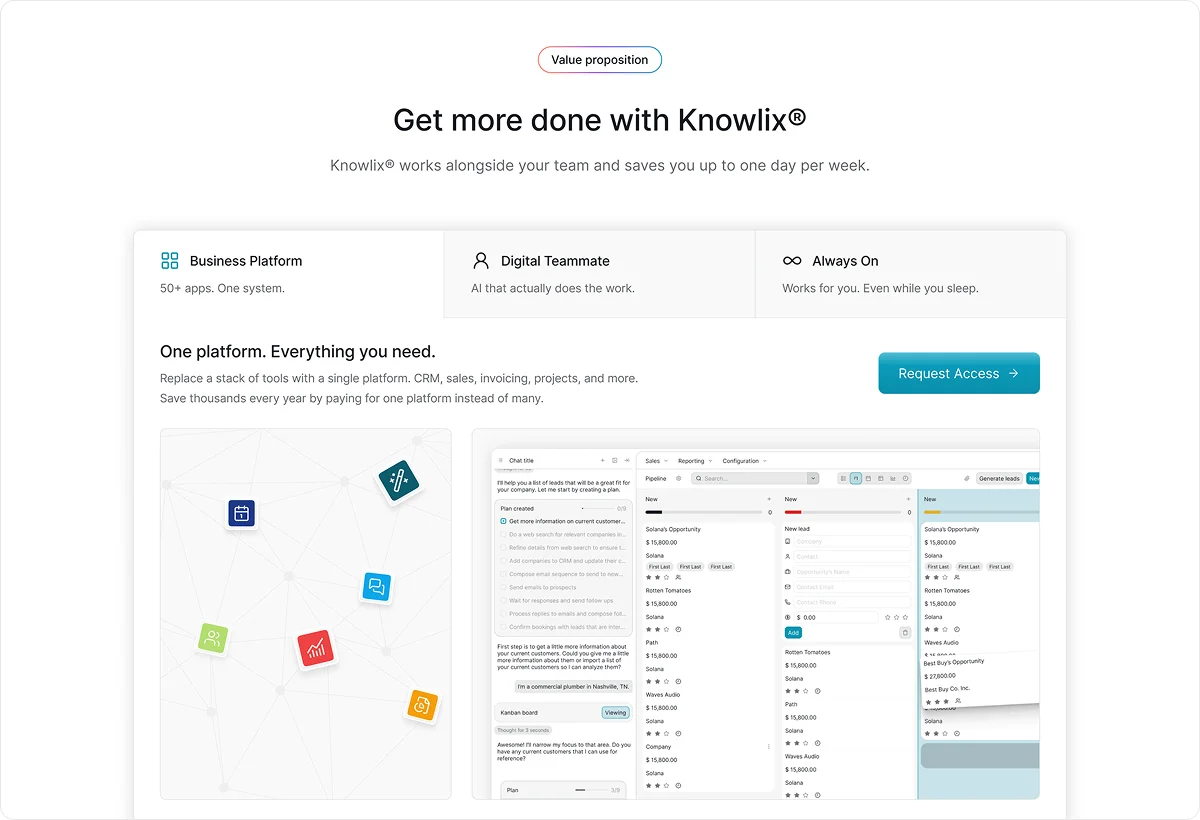
Knowlix is an all-in-one AI platform that combines a robust business management system with 50+ apps and integrated AI features. With Knowlix, each employee gets an AI teammate that understands context and takes manual work off their shoulders, enabling step-function productivity gains. The AI teammate can complete a wide range of tasks, including:
- Capturing leads
- Answering calls
- Creating quotes
- Scheduling meetings
- Forwarding issues
- Taking notes
It can perform many tasks automatically, but you can also use the chat function to assign tasks. The teammate will check in with you after it completes the task so you can approve the outcomes.
Knowlix has an intuitive interface that includes a customizable pipeline to help you track leads, assess the probability of success, and send follow-ups in one click.
Designed for small businesses, Knowlix is easy to implement and use regardless of your team’s skill level. It’s an adaptable, out-of-the-box solution that doesn’t require you to invest in system design or onboarding. Since most of its features are included with the basic plan, adding or removing them is as easy as pressing a button and doesn’t harm your budget.
Knowlix Pricing
- Free trial: 7 days, 25+ apps
- Teammate: €24.90 ($24.90) per user/month*
- Enterprise: Custom pricing
*Listed prices refer to the yearly billing model and may vary based on user location.
2. Pipedrive

Pipedrive is a CRM and sales platform with one of the most intuitive interfaces in the industry. Its best-known feature is the visual sales pipeline, which is a drag-and-drop board that provides a clear overview of deals at each stage and simplifies decision-making.
As for its AI capabilities, Pipedrive comes with a sales assistant that aids in conversations and suggests ways to improve your funnel based on analytics. Besides that, it can automate nearly your entire sales cycle, including lead routing and follow-ups.
While many platforms require technical know-how or external support to implement the CRM and integrations, Pipedrive has simplified these processes. Its marketplace offers over 500 pre-built integrations.
Pipedrive is a solid choice for small but ambitious teams as it has flexible pricing packages that make scaling easier and more cost-effective. Still, even the highest tiers lack some advanced features typically offered by popular platforms, such as integrated marketing and advanced automation logic.
Pipedrive Pricing
- Lite: $14 (€12) per user/month*
- Growth: $39 (€34) per user/month
- Premium: $59 (€51) per user/month
- Ultimate: $79 (€69) per user/month
*Listed prices refer to the yearly billing model.
3. Freshworks
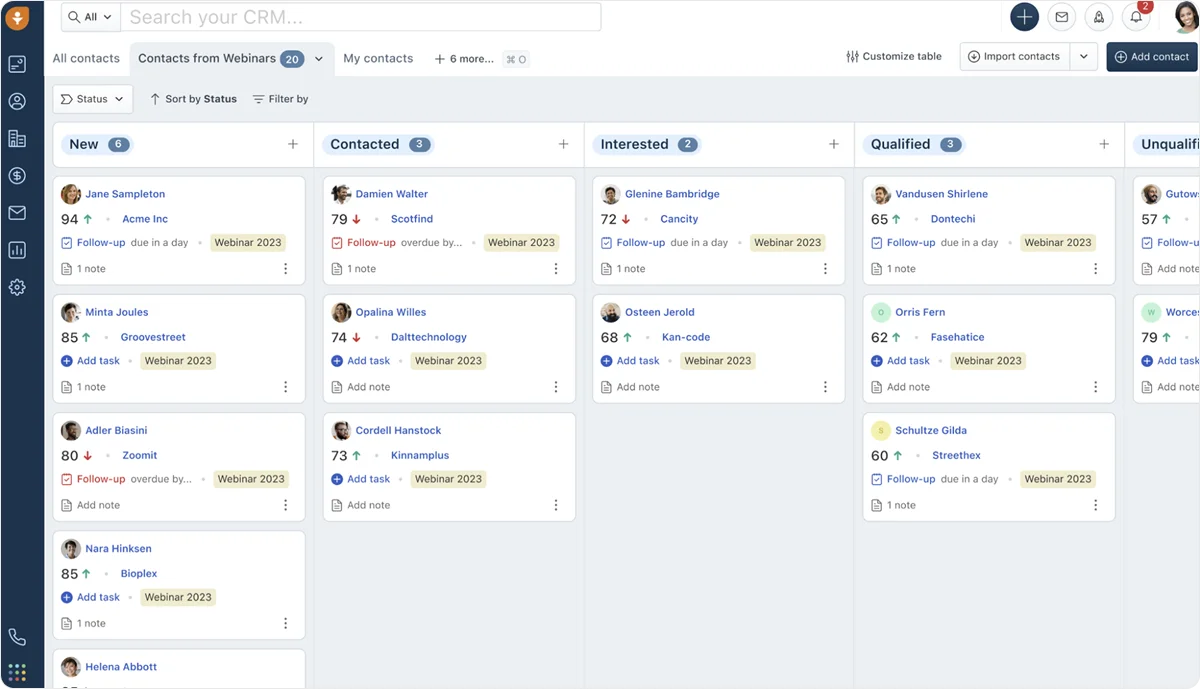
Freshworks is a simplicity-oriented CRM with a tightly integrated ecosystem. Besides CRM and sales, it can support customer service, service management, and marketing efforts, and streamline them with automation and AI. Freddy AI, its AI agent and assistant, can identify the best leads, write personalized messages, and help you search for data.
The most popular product is the Freshsales Suite, which combines CRM, sales, and marketing data to give you a 360° view of each customer, which improves decision-making. You can also engage with them across different platforms while managing all conversations in one inbox.
Freshwork is user-friendly and requires minimal effort to set up and learn. It also offers many customization opportunities, including custom fields, sales activities, and reports.
The pricing is affordable across all tiers, but your business may outgrow the platform rapidly as it lacks some advanced features like detailed analytics. Users also report experiencing occasional performance issues.
Freshworks (Freshsales Suite) Pricing
- Growth: $9 (€8) per user/month*
- Pro: $39 (€34) per user/month
- Enterprise: $59 (€51) per user/month
*Listed prices refer to the yearly billing model.
4. Salesflare
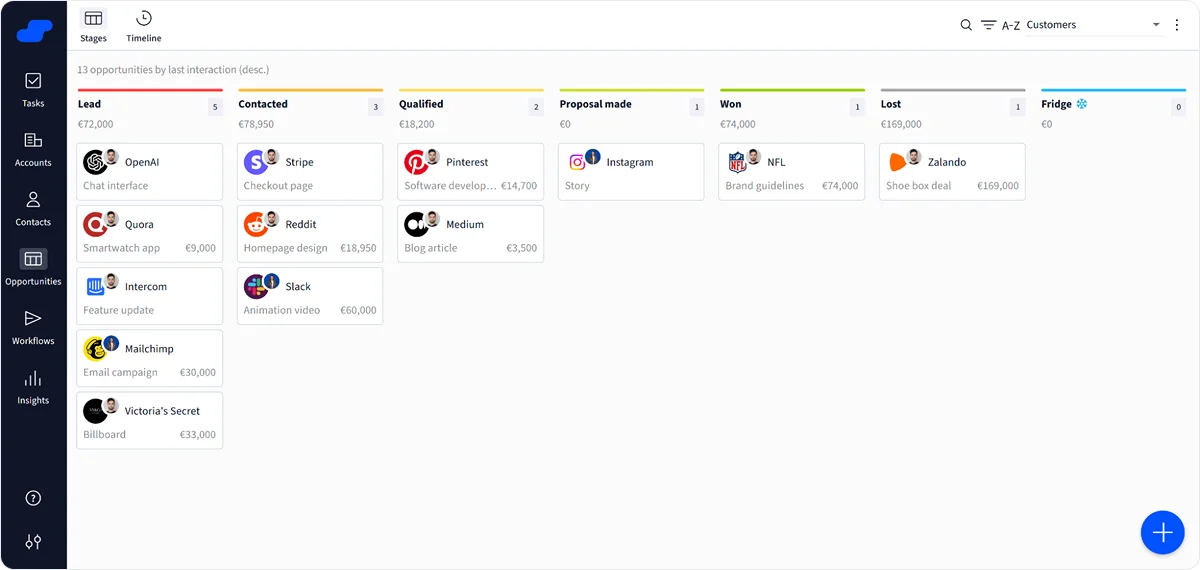
Salesflare is an AI-powered CRM platform built for small to medium-sized B2B businesses. It simplifies data entry and enrichment by automatically filling in contact and company information based on data from emails and the web.
The platform centralizes all your conversations, contacts, and tasks, which improves transparency and makes handovers between team members seamless. Like Pipedrive, it features a visual sales pipeline with drag-and-drop controls for easy deal management.
One of Salesflare’s standout features is relationship intelligence. The platform tracks interactions, scores leads, and sends reminders to prevent missed opportunities. Metrics such as relationship strength, segmentation, and personalized email sequences help you improve interactions at scale.
Salesflare is easy to onboard and use due to its clean, uncluttered interface. Since it focuses on the essentials, it could feel limiting for businesses seeking advanced features and automation.
Salesflare Pricing
- Growth: $29 (€25) per user/month*
- Pro: $49 (€43) per user/month
- Enterprise: $99 (€86) per user/month
*Listed prices refer to the yearly billing model.
5. Nimble
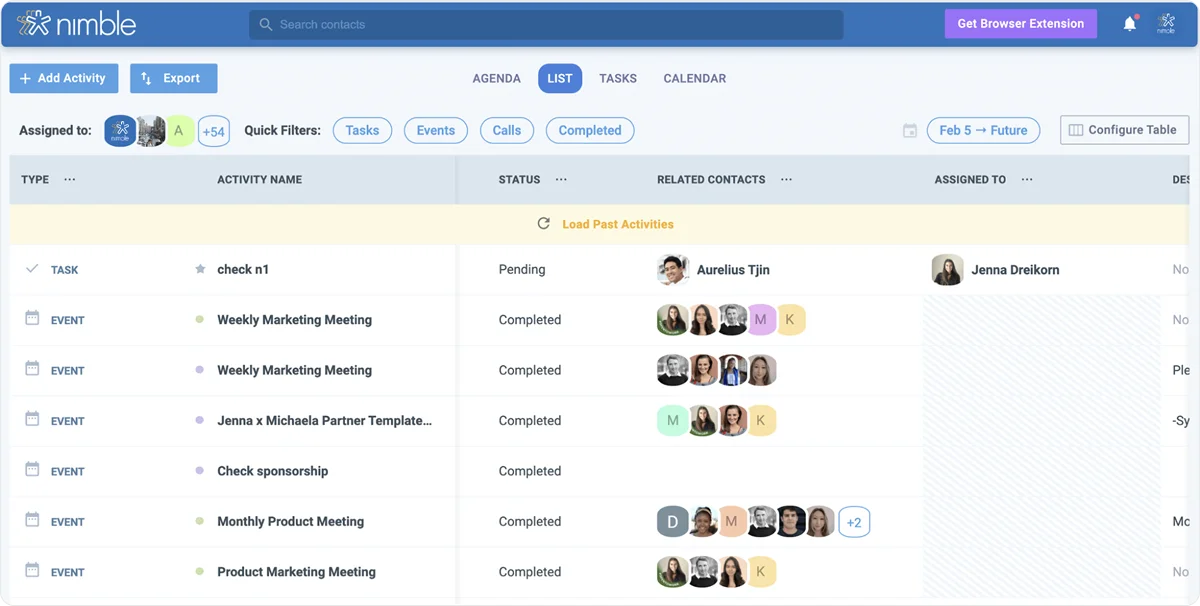
Named the 2025 Best CRM for Solopreneurs and Small Teams by Forbes, Nimble is a simple AI-driven platform that helps you nurture relationships and boost engagement. It bundles everything you need, including data, prospecting, and reporting, and connects the entire customer journey with a visual pipeline.
The platform also has built-in email marketing, so you can run full campaigns, capture leads with forms, and track results. Additionally, the AI Prospector saves you time by finding, enriching, and engaging leads instantly.
Nimble is intuitive and easy to pick up. One reason is its onboarding support, which includes free one-on-one calls, daily Q&A sessions, webinars, and extensive training materials.
Pricing is straightforward, as Nimble offers only one plan that includes most features. You can also purchase add-ons like AI marketing, data enrichment, and lead generation.
On the downside, Nimble lacks some of the team collaboration features found in platforms like Salesflare and Pipedrive, as well as advanced features often required by larger teams.
Nimble Pricing
- $24 (€21) per month/user (billed yearly)
- Add-ons start at $10 (€9) per month
6. HubSpot
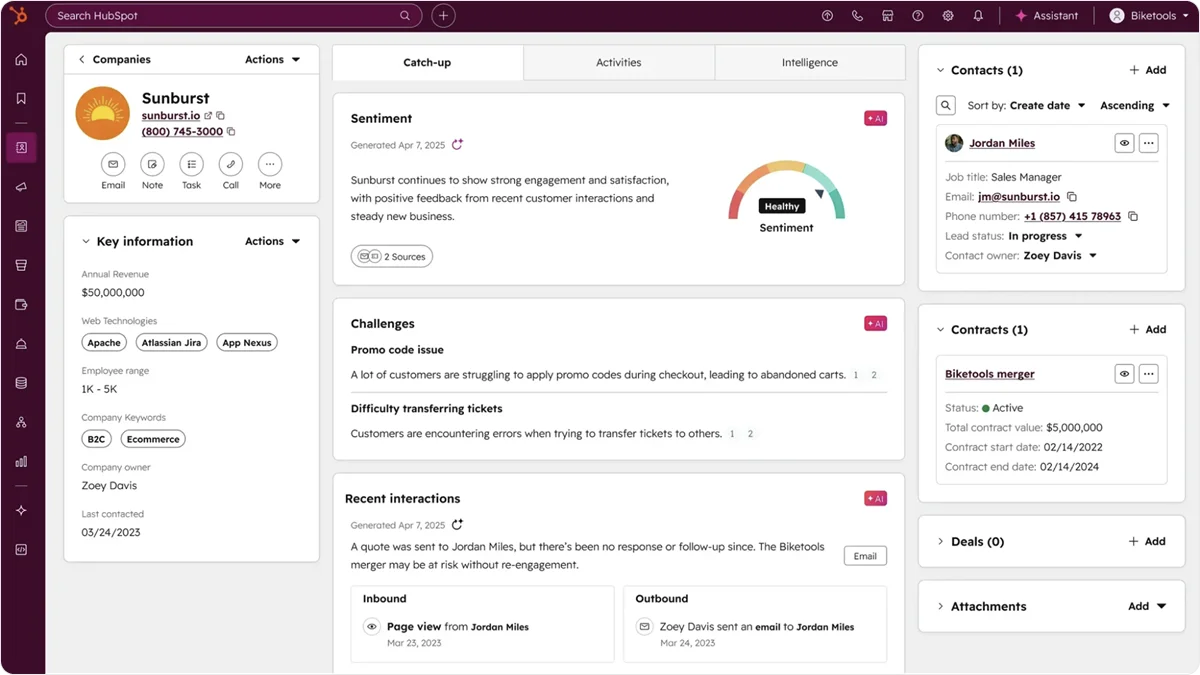
HubSpot is a comprehensive customer platform known for its clean, intuitive interface that helps small teams become productive quickly. While it can get expensive at higher tiers, it offers free and Starter plans designed specifically for founders and small businesses.
The Starter plan includes a wide range of tools for marketing, sales, and customer service, all powered by HubSpot’s Smart CRM.
When you're ready to scale, HubSpot's modular "Hub" architecture lets you add capabilities as needed, though the pricing increases significantly as you do. It’s a strong option for growth-oriented teams that want advanced features without piecing together multiple tools.
HubSpot’s Breeze assistant can work with your customer data, generate personalized emails and content, and prepare you for meetings. As of recently, you can also deploy custom AI agents.
One major benefit of selecting a well-established platform like HubSpot is the abundance of resources and support. While it may entail a learning curve due to its many features, HubSpot offers free education and training, and a founder-focused community. Additionally, its app marketplace features over 2,000 pre-built integrations.
HubSpot (Customer) Pricing
- Free
- Starter: $9 (€8) per user/month*
- Professional: $1,300 (€1,131) per month for 6 users
- Enterprise: $4,700 (€4,089) per month for 8 users
*Listed prices refer to the yearly billing model.
Buyers who start at the enterprise end usually shortlist Salesforce first. Our Salesforce alternatives comparison covers what changes when you move down-market from there.
Best AI CRM for Small Businesses: Final Thoughts
To choose the right AI CRM software, you should consider where you are, where you’re headed, and when you want to get there.
For example, HubSpot is a solid choice for ambitious teams that want a robust platform with room to grow into advanced features and have the budget to support it. On the other hand, platforms like Nimble are affordable and easy to adopt, but they may feel limiting as your business evolves.
Knowlix strikes the perfect balance between cost and capability, which is why it’s the overall best AI CRM for a small business. It offers an AI-first, all-encompassing solution that grows with your business without sudden price jumps or complex upgrades.
Sign up for Knowlix and give your small business the power and efficiency of a Fortune 500.


Frequently asked questions


Free AI CRMs and free tiers can work for small teams with one to five users and help them get started. Free tools allow them to centralize data and automate basic tasks and communications.
Still, teams usually outgrow these features quickly. Also, free tools tend to offer limited to no support, so obstacles can be costly and frustrating.
The time investment will depend on factors like the complexity of your chosen tool, team size, and technical skill level.
For instance, an enterprise switching to a complex system like Salesforce may require months. In contrast, a small business that chooses Knowlix could get started immediately, as the platform is easy to set up, use, and customize, and offers implementation support.
Consider using software when you have more than ten clients and it becomes challenging to manage data, track leads, and switch between tools. Tell-tale signs are communication errors and missed interaction opportunities. Ideally, you should be proactive and switch to dedicated software before issues occur.
Subscribe for Our Newsletter
Book your call below.


Check your website health score
Scan your site in seconds and make sure you're beating your competitors.
