
ERP Automation: Benefits, Use Cases & Tools for 2026

ERP automation is a process that handles repetitive tasks by using AI and workflow engines.
It helps small businesses operate more efficiently and scale operations without constantly increasing headcount or complexity.
Read on to learn more about how you can leverage ERP automation in practical, high-impact ways.
Key takeaways
- ERP automation removes repetitive work and boosts efficiency
ERP automation uses AI and workflows to handle tasks such as invoicing, reporting, and inventory updates. This reduces manual workload, removes bottlenecks, and allows small teams to focus on higher-value activities. - Better data quality leads to more reliable business decisions
By standardizing processes and validating data in real time, ERP automation reduces human error in finance, inventory, and reporting. - Real-time insights help businesses react faster and plan ahead
Instead of waiting for delayed reports, ERP systems provide live visibility into sales, cash flow, and operations. Many also include predictive analytics to forecast demand, identify risks, and support faster, more informed decisions. - Automation lowers costs while making business growth easier
Businesses reduce operational costs by cutting manual labor and avoiding inefficiencies such as overstocking and invoicing errors. ERP systems scale with the business, making it easier to grow without constantly adding tools or staff. - Unify tools, teams, and workflows with Knowlix
Instead of using multiple disconnected systems, Knowlix brings ERP functions, CRM, and AI automation into one workspace. This helps businesses streamline operations, automate end-to-end workflows, and manage everything from a single system with less complexity.
What is ERP automation?
ERP automation is the integration of AI, intelligent workflows, robotic process automation (RPA), and real-time analytics within Enterprise Resource Planning (ERP) systems to handle repetitive tasks, streamline data flow, and improve decision-making.
This way, tasks such as sending invoices, updating inventory, or generating reports can happen automatically, often in real time.
5 key benefits of ERP automation
ERP automation deals with the biggest constraints for small businesses: time, budget, and manpower.
Here are the top benefits ERP automation brings:
| Benefit | What it does | Business impact |
|---|---|---|
| Increased efficiency | Automates repetitive tasks and streamlines workflows | Saves time, reduces bottlenecks, and frees teams for higher-value work |
| Fewer errors & reliable data | Standardizes processes and validates data automatically | Improves accuracy, reduces costly mistakes, and builds trust in data |
| Real-time insights | Provides live data and predictive analytics | Enables faster decisions and helps anticipate trends and risks |
| Lower costs & scalability | Reduces manual labor and optimizes resource use | Cuts operational costs and supports growth without added complexity |
| Improved customer experience | Automates end-to-end processes and communication | Speeds up service, reduces delays, and delivers a more consistent experience |
1. Increased efficiency
One of the most immediate and noticeable benefits of ERP automation is a boost in efficiency without the need to hire more people.
In many small businesses, employees spend a significant portion of their day on repetitive administrative tasks such as entering data, processing invoices, updating orders, or compiling reports. While these tasks are necessary, they don’t directly contribute to growth.
With ERP automation, these processes run in the background with little to no manual input. Besides saving hours of work each week, ERP automation also reduces bottlenecks caused by manual handoffs between team members.
This also means that, instead of being buried in admin work, your team can focus on higher-value work, such as improving the customer experience or growing sales.
2. Fewer errors and more reliable data
A small error in an invoice, a miscounted inventory level, or an incorrect financial report can quickly snowball into bigger problems, including lost revenue, unhappy customers, and poor decision-making.
When processes are manual, these risks are always present.
ERP automation reduces these errors by standardizing how tasks are performed and ensuring data is handled consistently across the system.
Instead of relying on human input at every step, automated workflows follow predefined rules and validations.
For example, invoices are always generated with accurate pricing and customer data, inventory levels update instantly after each transaction, and reports pull directly from live, synchronized data sources.
As a result, ERP automation builds trust in your data, which is essential when making financial or operational decisions.
3. Real-time insights
ERP automation provides real-time visibility into every aspect of your business.
You don’t need to wait for weekly or monthly reports to spot opportunities. Instead, you can instantly access live data on sales performance, cash flow, inventory levels, and customer activity.
This allows you to make decisions based on what’s happening right now, not what happened last week.
In addition, predictive analytics tools in ERP systems analyze historical and real-time data to identify trends and forecast future outcomes.
For example, they can help you anticipate demand spikes, detect slow-moving products, or predict potential cash flow shortages so you can react on time.
4. Lower costs and easier scalability
By automating routine processes, businesses can reduce the manual labor they need for daily operations.
Besides lowering payroll costs, it also minimizes the hidden costs related to human error, inefficiencies, and delays.
For example, automated invoicing reduces billing mistakes that could delay payments, while streamlined inventory management prevents overstocking or stockouts that tie up cash or lead to missed sales. Gradually, these efficiencies add up, creating a leaner and more cost-effective operation.
62% of businesses using ERP systems spotted noticeable cost reductions as a direct result of automation, with the greatest impact in purchasing and inventory management, where some companies achieved cost savings of up to 30%.
At the same time, ERP systems scale alongside your business and manage increased workloads without requiring a complete overhaul. You don’t need to constantly invest in new tools or expand your team just to keep up.
The combination of cost savings and scalability is valuable for small businesses looking to grow sustainably.
It allows you to expand operations knowing your systems can support you without becoming a financial burden or operational bottleneck.
5. Improved customer experience
Instead of focusing on individual tasks, ERP systems connect multiple steps into a seamless, continuous process that requires minimal human intervention. As a result, they can automate entire workflows from start to finish.
Take a typical order cycle as an example.
A customer places an order online, and the system immediately updates inventory levels, generates an invoice, processes the payment, and triggers shipping, all automatically.
The customer receives real-time updates about their order status without anyone on your team having to manually send emails or track progress.
Automation eliminates many of the issues that slow operations.
There’s no need to manually transfer information between departments or systems, which reduces delays and the risk of miscommunication.
The result is faster turnaround times, more consistent operations, and a better customer experience.
Customers get what they want quickly and reliably, while your team spends less time managing processes and more time focusing on growth and innovation.
Practical uses of ERP automation for small businesses
Here’s how small businesses can use ERP automation day-to-day:
| Area | What it does | Business impact |
|---|---|---|
| Finance & accounting | Automates invoicing, expense tracking, transaction reconciliation, and reporting | Improves cash flow, reduces errors, and saves time on bookkeeping |
| Inventory & supply chain | Updates stock levels, triggers reorders, and forecasts demand | Prevents stock issues, optimizes inventory, and improves supplier coordination |
| Sales & CRM | Tracks leads, automates follow-ups, and scores customer interactions | Increases conversions and streamlines the sales process |
| HR & payroll | Manages onboarding, payroll, attendance, and benefits | Reduces admin workload and ensures compliance |
| Order processing & eCommerce | Processes orders, syncs inventory, coordinates shipping, and sends updates | Speeds up fulfillment and improves customer experience |
| Reporting & Business Intelligence | Generates reports, updates dashboards, and tracks KPIs in real time | Enables data-driven decisions with up-to-date insights |
| Customer support | Routes tickets, prioritizes issues, and integrates chatbot responses | Improves response times and enhances customer satisfaction |
4 top ERP automation tools you should know about
ERP automation tools can help small businesses streamline operations, automate repetitive tasks, and provide real-time insights.
Here are our top picks, based on ease of implementation and use, AI and automation capabilities, scalability and integration, and pricing:
| ERP platform | Stellar feature(s) | Best for | Pricing |
|---|---|---|---|
| Knowlix | All-in-one business growth platform with 50+ apps and an integrated AI teammate for projects, sales, invoicing, and more | Smaller businesses looking for a unified, robust solution that is easy to use | 7-day trial, then $24.90 (€24.90) per user per month |
| Oracle NetSuite | Automated transaction management | Companies with multi-location or multi-subsidiary operations | Annual subscription model and a one-time implementation fee |
| Sage Intacct | Multi-dimensional general ledger | Service businesses looking for financial management capabilities | Subscription-based pricing depending on user count, number of business entities, and selected modules |
| Zoho ERP | Real-time workflow automation | Businesses already using Zoho apps | Plans start from $32 (€28) per user per month |
1. Knowlix
Knowlix is an all-in-one AI platform that centralizes business data and tools, such as project management, sales, marketing, and more, streamlining workflows and reducing app switching.
It enables teams to collaborate more efficiently by working within a single system, supported by a built-in AI assistant that automates routine tasks and improves day-to-day operations.
With features like AI note-taking and access to 50+ integrated business and AI tools, Knowlix helps streamline workflows, reduce manual work, and keep teams aligned across departments.
2. Oracle NetSuite
This is a cloud-based ERP platform that automates and connects core business operations, such as finance, inventory, order management, and CRM, within a single system.
It helps businesses streamline financial processes, gain real-time visibility into performance, and manage accounting, procurement, and global operations.
Key capabilities include automated transaction management, faster budgeting and forecasting, unified financial reporting, and centralized procurement.
3. Sage Intacct
Sage Intacct is a cloud-based financial management and ERP platform focused on automating accounting, reporting, and multi-entity operations.
While it doesn’t include native modules for areas like inventory or CRM, it integrates with other tools to extend its functionality.
Key capabilities include project accounting and costing, AI-powered automation for tasks such as data extraction and bank reconciliation, built-in multi-entity consolidation, and advanced reporting with dashboards and multi-dimensional analysis.
4. Zoho ERP
This is a cloud-based ERP solution that brings together finance, inventory, sales, HR, supply chain, and project management, with built-in AI to automate and optimize operations.
Key capabilities include financial management, real-time inventory and supply chain tracking, flexible billing automation, AI-driven inventory categorization, and an AI-powered assistant that generates quotes and invoices in natural language.
How to automate business operations with Knowlix?
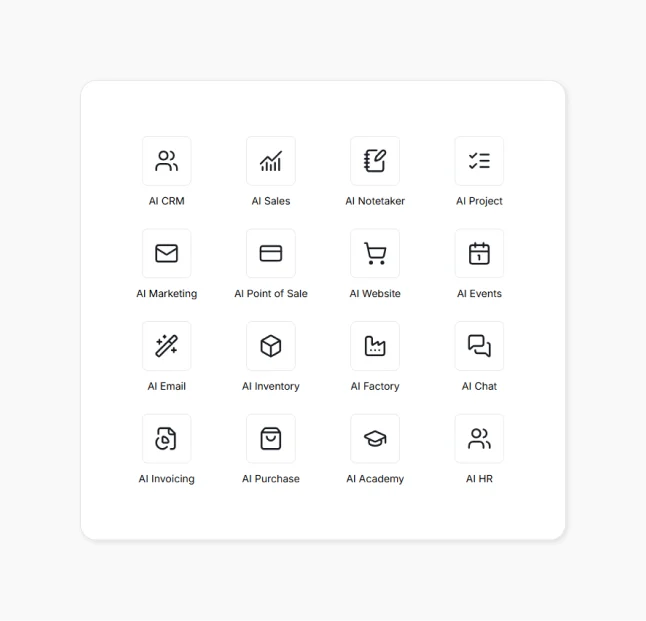
Knowlix is an all-in-one AI business platform that unifies a complete business management system and more than 50 integrated applications in a single workspace.
Instead of juggling multiple disconnected tools, businesses can manage operations, sales, and finances seamlessly from one platform.
You can enable or disable apps with a single click, activate only the tools you need at any given stage, and expand functionality as you grow.
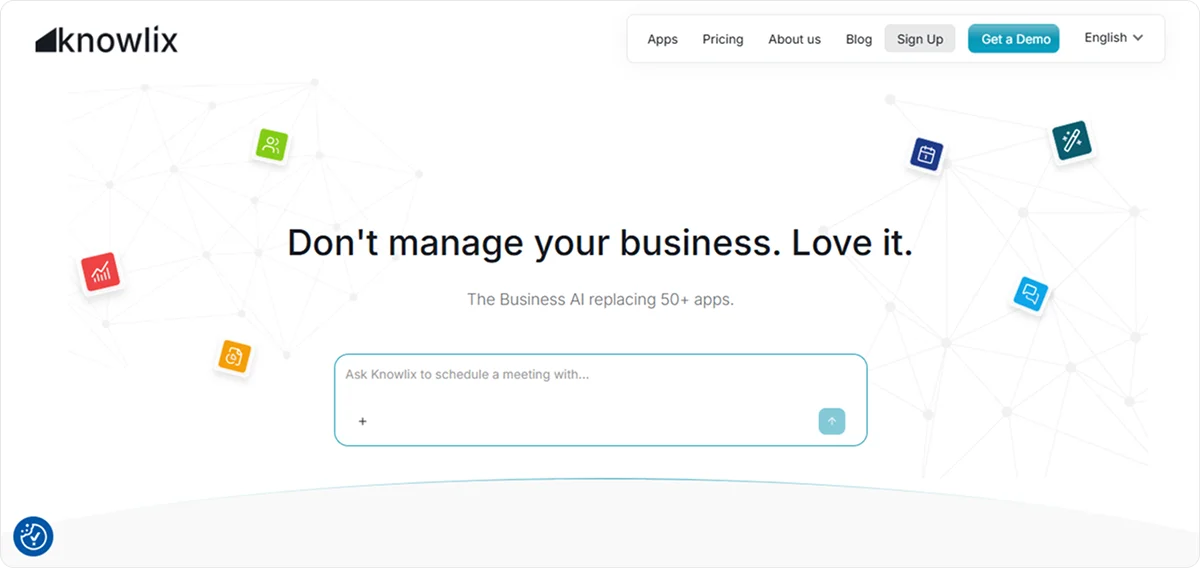
Knowlix combines full CRM capabilities for lead and sales management with ERP-style functions such as invoicing, project management, and operational workflows, all enhanced by an AI Teammate that automates and streamlines everyday tasks.
It works proactively alongside your team and replaces the need for multiple standalone AI tools, such as chat assistants, phone agents, website builders, email helpers, customer support bots, sales assistants, and marketing tools, by bringing them into a unified system.
Because the AI Teammate operates directly inside your business environment, every action is connected to your existing data, and nothing happens in isolation.
It understands context, updates the correct records, and suggests relevant next steps automatically.
For example, after a meeting, it can summarize notes, add or update contacts and lead information, draft follow-up emails, generate quotes, create new tasks in a project tracker, and move deals through the sales pipeline.
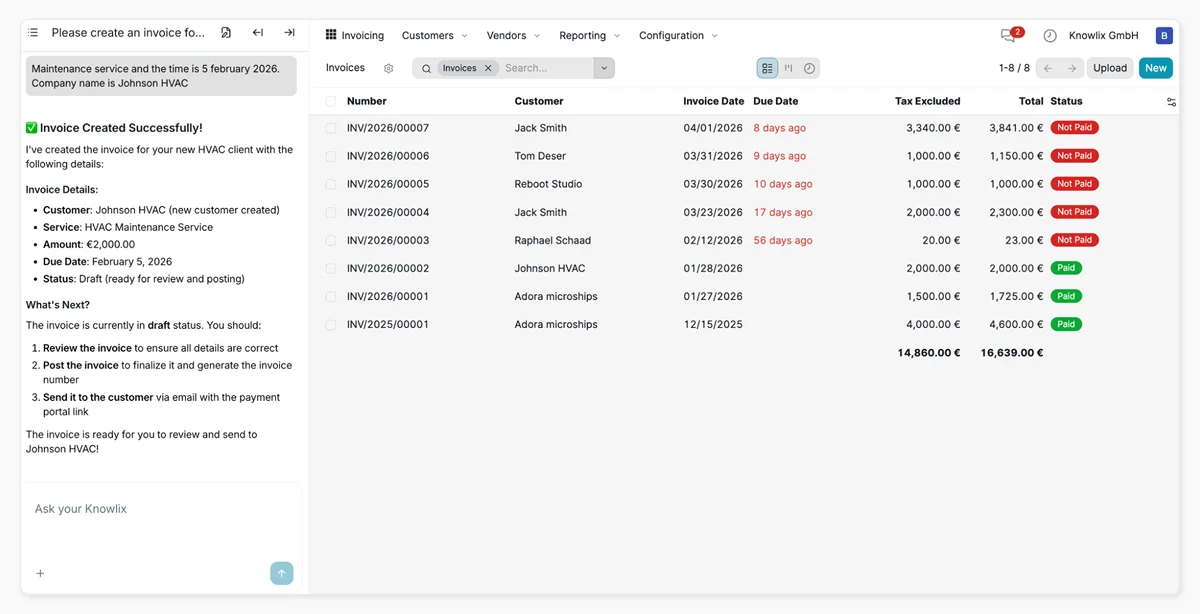
All updates are visible to relevant team members, but the AI Teammate doesn’t execute actions without approval. This ensures that teams maintain full control while reducing the manual workload.
You can train the AI Teammate on your company’s processes, terms, and workflows so it works consistently and “understands” how your business actually operates.
By combining documentation and execution in one flow, it reduces the need for follow-up work, speeds up operations, and helps teams stay coordinated and efficient.
With Knowlix, you can:
- Get a working instance in two minutes with the modules installed, without an onboarding project first
- Cut costs by replacing multiple separate tools with one platform
- Reduce manual, repetitive work
- Gain clearer visibility across your entire business
- Automate key workflows end-to-end
Sign up for Knowlix to see how you can automate daily workflows and run your entire business from one AI-powered platform.


Frequently asked questions


ERP automation streamlines key workflows, including invoicing, inventory updates, order processing, and reporting. It reduces manual errors and speeds up information flow across departments.
As a result, teams spend less time fixing issues and more time on growth and customer service.
The main benefits include lower operational costs, better decision-making through real-time data, and easier scalability as the business grows.
Companies can also see fewer errors and improved efficiency because processes run consistently in the background.
ERP automation helps small businesses operate with the structure and speed of much larger companies.
It handles repetitive business tasks inside an ERP system without manual effort.
Automation helps small businesses reduce time spent on admin work, improve accuracy, and run operations more efficiently.
Instead of managing separate tools and spreadsheets, everything is integrated into a single system with real-time data.
Subscribe for Our Newsletter
Book your call below.


Check your website health score
Scan your site in seconds and make sure you're beating your competitors.
