
8 Best Zoho Alternatives for CRM & Business Tools [2026]

.webp)
The 8 best Zoho alternatives in 2026 are Knowlix, HubSpot, Salesforce, Freshworks, Pipedrive, Microsoft Dynamics 365, ClickUp, and Monday. For SMBs replacing a multi-tool stack, Knowlix is the closest direct Zoho One replacement: one workspace covers CRM, projects, invoicing, and helpdesk, with an AI Teammate that runs work on autopilot, starting at $24.90 per user per month with a free tier.
For sales-only teams under 20 people, Pipedrive or HubSpot ship faster. For Microsoft-ecosystem enterprises with 200+ people, Dynamics 365 is the better fit. Knowlix is the right pick when the goal is consolidation without the cross-app setup tax Zoho's 40+ apps require.
Zoho is a popular business platform known for its wide range of features and affordable entry point. Still, popularity doesn’t guarantee the right fit.
For example, small businesses often find Zoho unsuitable due to its rigid pricing structure and customization difficulty, which undermine scaling efforts.
Additionally, the platform’s interface is notoriously cluttered and overwhelming, especially for new users. And with customer support reportedly being slow and unhelpful, setting up and resolving issues can easily turn into costly downtime.
This article introduces you to the 8 best Zoho alternatives in 2026, including their features and pricing.
How we evaluated these tools
We compared the eight platforms on five criteria:
- Range of features — total number of business functions covered (CRM, project management, invoicing, helpdesk, automation, AI).
- AI capabilities — whether AI is included in the base price and whether it can execute work autonomously or only summarize and suggest.
- Pricing model — per-seat versus flat-rate, plus what features are gated behind enterprise tiers.
- Time to first value — days from signup to first productive use, based on vendor onboarding documentation and reviewer reports.
- SMB fit — appropriateness for teams of 5 to 50 people, drawn from G2 (4,000+ reviews across these vendors) and Capterra (3,500+ reviews).
Pricing verification: All prices verified on 2026-06-03 against each vendor's official pricing page. We list annual-billing prices where vendors publish them, since that is the price most SMBs actually pay.
Hands-on testing: We use Knowlix daily. We did not run paid trials of competing platforms — claims about competing-vendor AI quality, setup time, and feature depth are based on vendor documentation, G2 and Capterra reviewer summaries, and Gartner Peer Insights coverage.
Zoho Alternatives at a Glance
Here’s a quick comparison of our top picks for Zoho alternatives:
Zoho AlternativesOverviewAdvantages Over ZohoPricingKnowlixAll-in-one business growth platform with 50+ apps and integrated AI teammatesIntegrated intelligenceEase of use and adoptionFast setupAdaptabilityLow costsStep-function productivity gains7-day trial, then $24.90 (€24.90) per user/month*HubSpotCustomer platform with modular CRM, marketing, sales, and service hubsEase of useSolid customer supportFree + paid plans start at $9 (€8) per month/userSalesforceCRM platform with over 10 products, suitable for enterprisesAdaptabilityScalabilityExcellent integrationsFree + paid Sales plans start at $9 (€8) per user/monthFreshworksCRM platform with customer service capabilitiesEase of useFast setupSmall learning curveLow costsStarts at $9 (€8) per user/monthPipedriveCRM platform focused on sales and pipeline managementEase of use and adoptionFast setupAdaptability of pricingSolid customer supportStarts at $14 (€12) per user/monthMicrosoft Dynamics 365Business platform suitable for enterprises within the Microsoft ecosystemScalabilityCustomizabilityBusiness Central starts at $80 (€70) per user/monthClickUpAll-in-one project management platformEase of useCustomizabilityCross-device compatibilityLow costsFree + paid plans start at $7 (€6) per user/monthMondayProject management operating system with dedicated modules for CRM, sales, marketing, etc.Ease of use and adoptionStarts at $12 (€10) per user/month
*Check vendors’ official websites for up-to-date, location-specific pricing.
Try Knowlix free.
Import your Zoho contacts and run one workflow today.→ Start free
Zoho Alternatives: Zooming in on 8 Best Options
Our team has analyzed the available tools, focusing on aspects like range of features, ease of use, pricing, and user reviews. These 8 platforms stood out:
1. Knowlix
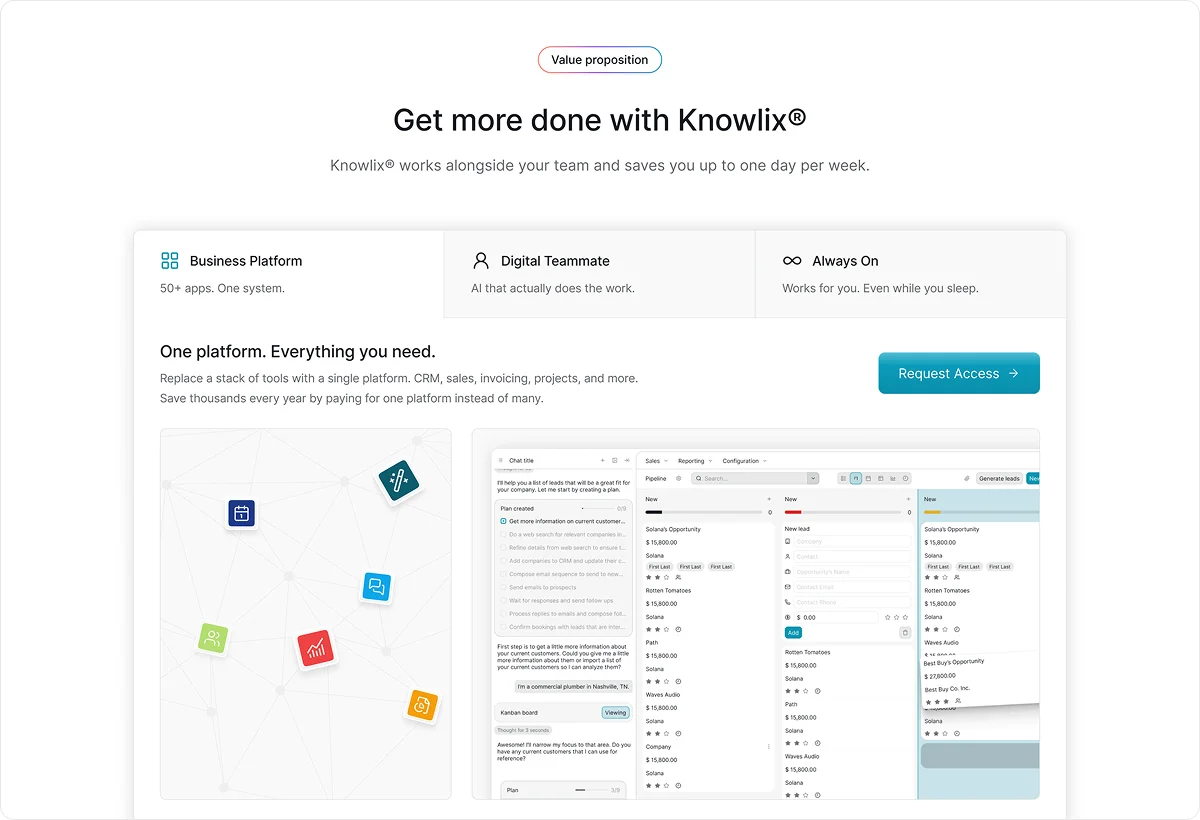
Knowlix is an all-in-one, AI-first platform built for small businesses that need a powerful growth tool without the complexity.
Knowlix offers traditional business software amplified with an AI teammate. Its 50+ apps span all operational areas of your business, including CRM, sales, project management, and HR. Setup is quick and painless, as there’s no need to design your system, train your team, or integrate external apps.
Unlike Zoho, Knowlix makes customization easy. You can start with the apps and services you need, then activate or deactivate them in one click as needed. Instead of forcing you to adapt, Knowlix and its digital teammate adapt to you. They learn your workflows, understand CRM data and context, and handle tasks automatically.
As a result, you can boost productivity without adding headcount and improve sales, engagement, and retention quickly.
Knowlix Key Features
- AI teammate: You can chat with your teammate using natural language and assign tasks, such as scheduling meetings or creating quotes. The teammate checks in with you after the task is done.
- Intelligent CRM: Knowlix CRM automatically captures emails and calls and adds them to your database. It also has built-in AI invoicing, AI project management, and AI sales features.
- Visual pipeline: This customizable view lets you track deals across stages, assess the probability of success, and send emails or text messages instantly.
- AI phone assistant: The assistant can answer calls, respond to common inquiries, forward issues, and take notes. All transcripts are available in your dashboard.
Knowlix Pricing
- Free trial: 7 days, 25+ apps
- Teammate: $24.90 USD (€24.90 EUR) per user / month, annual billing
- Enterprise: custom pricing
Pricing verified 2026-06-03 via knowlix.ai/pricing. Prices may vary by region; check the pricing page for your location.
*Listed prices pertain to the yearly billing model and may vary based on user location.
2. HubSpot
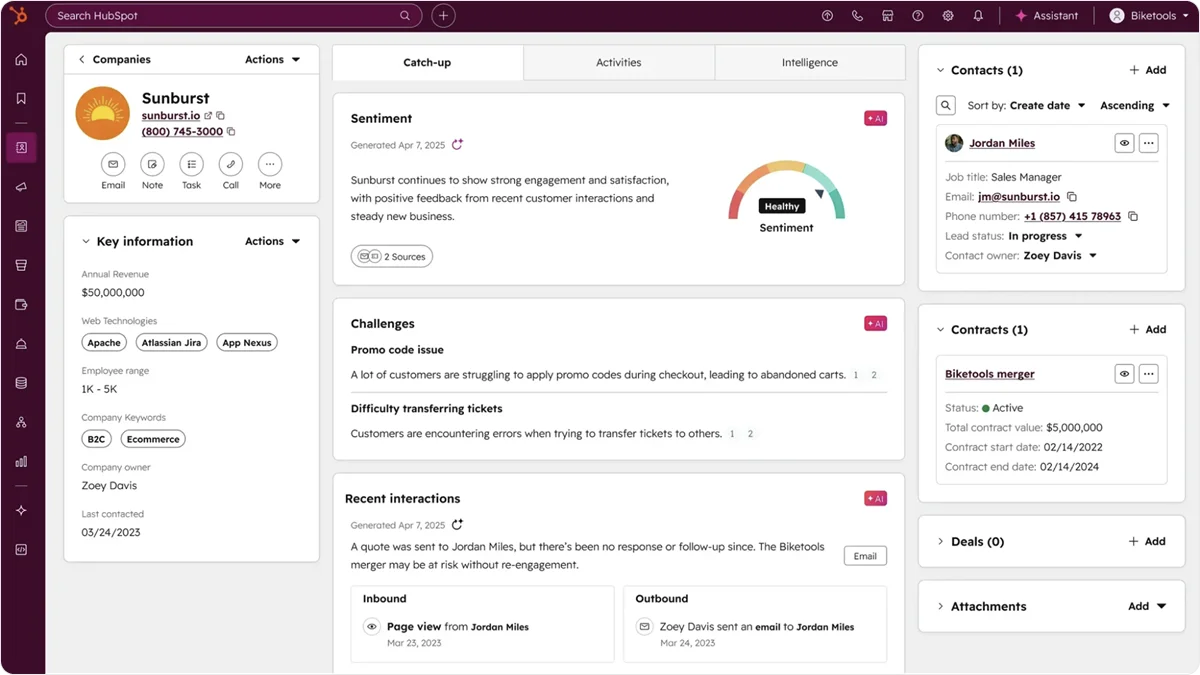
HubSpot is a comprehensive customer platform that offers a cleaner, more intuitive interface than Zoho and many other competitors, which simplifies onboarding. While it’s not as customizable as Zoho, HubSpot integrates smoothly across its ecosystem and offers more reliable customer support.
Still, these benefits may come at a hefty price. While the lower tiers are comparable to Zoho’s, the pricing increases dramatically once your business outgrows them.
HubSpot Key Features
- Modular “Hub” architecture: HubSpot offers separate “hubs” for marketing, sales, and other departments. You can save by purchasing only the capabilities you need.
- Breeze agents: These AI agents can assist in sales, writing, and many other tasks.
- Smart CRM: This module offers various traditional and modern features, including automatic data enrichment and cleaning, custom reporting, and audit logs.
HubSpot Pricing
Smart CRM:
- Professional: $45 (€39) per user/month*
- Enterprise: $75 (€65) per user/month
Sales:
- Free
- Starter: $9 (€8) per month/user
- Professional: $90 (€78) per month/user
- Enterprise: $150 (€130) per month/user
*Listed prices pertain to the annual billing model. Pricing verified 2026-06-03 via hubspot.com/pricing/crm (visit vendor site to confirm).
3. Salesforce

Salesforce is a highly customizable platform built to handle enterprise-level operations. It offers greater depth than Zoho, so it allows you to modify nearly every system element to accommodate your processes. The platform also provides more extensive and seamless integrations with external tools.
Besides various products aimed at departments like sales and marketing, Salesforce has over a dozen industry-specific products with pre-built data models and workflows.
This level of comprehensiveness comes at a cost, though. The platform can be challenging to learn, and users often report performance issues. Additionally, the setup and maintenance expenses are high and can add up quickly.
Salesforce Key Features
- Agentforce: This module lets you build, test, and deploy custom AI agents that adapt to your workflows.
- AppExchange and AgentExchange: These are marketplaces that come with nearly 10,000 pre-built app integrations and AI agents.
- Advanced analytics: Salesforce offers AI-powered analytics and reporting with predictive, prescriptive, and contextual insights.
Salesforce (CRM) Pricing
- Free (2 licenses)
- Starter Suite: $25 (€22) per user/month*
- Pro Suite: $100 (€87) per user/month
*Starter and Pro require an annual contract. Pricing verified 2026-06-03 via salesforce.com/pricing (visit vendor site to confirm).
4. Freshworks
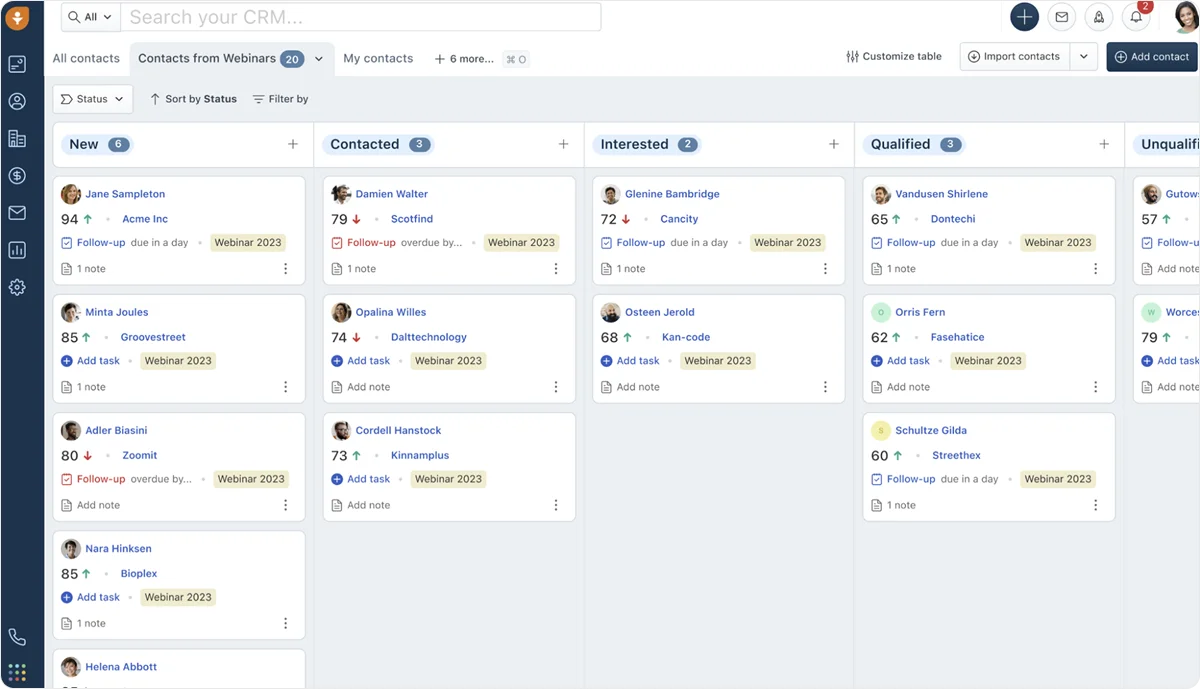
Freshworks positions itself as a refreshing alternative to bloated legacy software. While Zoho’s ecosystem is vast, Freshworks offers a smaller but more tightly integrated suite. It’s also more cost-effective, though it doesn’t come with a free plan like Zoho.
Freshworks’ simple interface makes the platform easy to use, set up, and customize without much training. Because of that, it’s suitable for up-and-coming businesses requiring a quick time-to-value.
On the downside, the platform may be too limited for some businesses. Users claim that the reporting lacks detail and that performance issues can occur with more demanding work.
Freshworks Key Features
- Freshsales Suite: This product combines Freshworks’ CRM, sales, and marketing modules to give you a 360° view of your customers and boost conversions.
- Freddy AI: Named “people-first AI,” Freddy offers ready-to-launch agents that can handle everyday tasks like processing refunds and assist in writing and translation.
- Omnichannel engagement: Freshworks natively integrates phone, email, WhatsApp, and live chat into a single "universal inbox.”
Freshworks (Freshsales Suite) Pricing
- Growth: $9 (€8) per user/month*
- Pro: $39 (€34) per user/month
- Enterprise: $59 (€51) per user/month
*Listed prices pertain to the annual billing model. Pricing verified 2026-06-03 via freshworks.com/freshsales/pricing (visit vendor site to confirm).
5. Pipedrive

Like Freshworks, Pipedrive is a platform built around simplicity, and it focuses on CRM and sales only. Pipedrive is best known for its intuitive and unique interface design. Setup is fast, the learning process is easy, and the customer support is actually helpful.
Another advantage of Pipedrive over Zoho is the adaptability of its subscription packages. The platform has simplified scaling, so small businesses can upgrade it without a dramatic price jump or tedious technical work.
Still, Pipedrive is not a business suite. Some features, automation capabilities, and customization options are missing.
Pipedrive Key Features
- Visual sales pipeline: This drag-and-drop Kanban board gives you an overview of deals at each stage, and makes it easy to spot bottlenecks and opportunities for interaction.
- AI sales assistant: Pipedrive AI streamlines tasks and communication, and helps you make smarter sales decisions.
- Marketplace: It’s easy to integrate your Pipedrive with over 500 apps and automate tasks across your stack.
Pipedrive Pricing
- Lite: $14 (€12) per user/month*
- Growth: $39 (€34) per user/month
- Premium: $59 (€51) per user/month
- Ultimate: $79 (€69) per user/month
*Listed prices pertain to the annual billing model. Pricing verified 2026-06-03 via pipedrive.com/pricing (visit vendor site to confirm).
6. Microsoft Dynamics 365
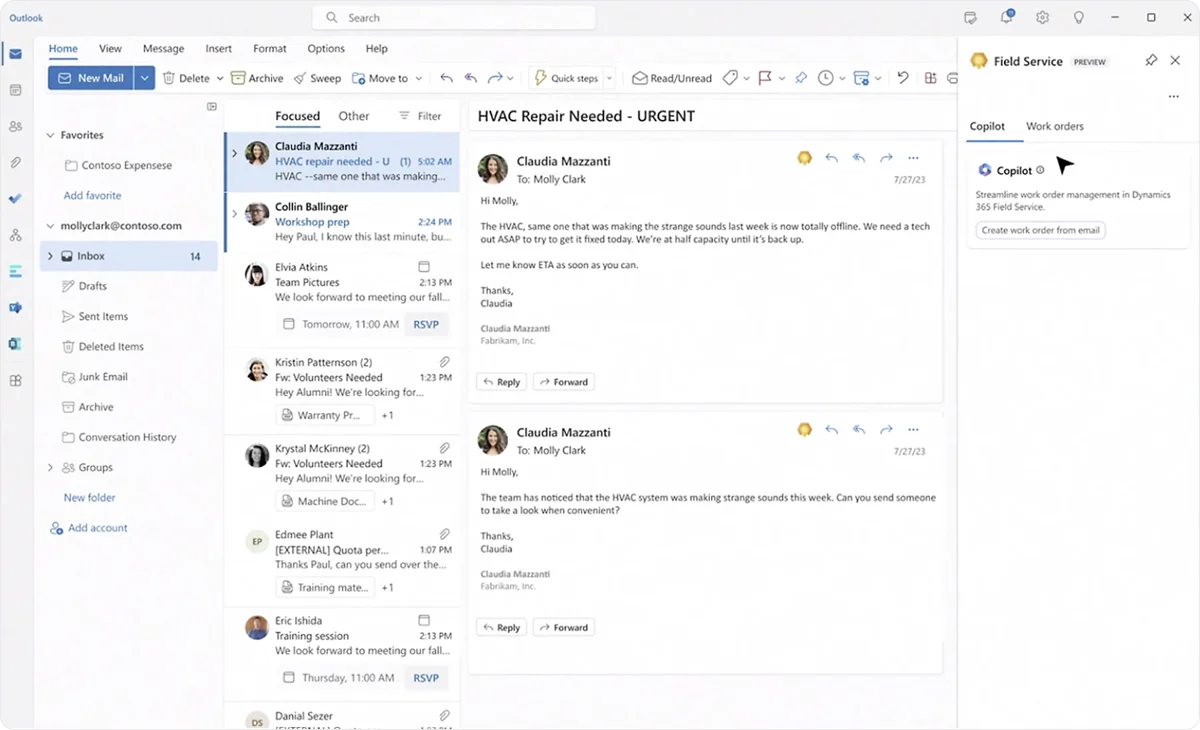
Microsoft Dynamics 365 is a suitable Zoho alternative for enterprises. It’s robust, vast, and powerful, and it integrates seamlessly with Microsoft apps. The depth of features is impressive as sales teams get granular control over everything, including stages, forecasting, and revenue.
Naturally, this vastness and depth come with a complex setup process. Many businesses have to seek administrator support. Users without technical experience often face a steep learning curve, but most find the platform intuitive once they've invested the time.
While Dynamics 365 offers scalability, it’s expensive and has a complicated licensing model that requires careful consideration to avoid overbuying.
Also, keep in mind that the platform is intended for companies already in the Microsoft environment. Those that aren’t could lose some of the listed benefits.
Microsoft Dynamics 365 Key Features
- Holistic customer view: Dynamics 365 unifies all your customer data and enriches it with AI.
- AI capabilities: These include AI-driven predictive lead and opportunity scoring, Copilot for triage and follow-up writing, and custom AI agents.
- Power BI: Integration with Power BI is simple, and it provides you with top-of-the-line analytics and reporting features.
Microsoft Dynamics 365 Pricing
Business Central:
- Business Central Essentials: $80 (€70) per user/month*
- Business Central Premium: $110 (€96) per user/month
Customer Insights:
- Customer Insights: $1,700 per tenant/month
- Customer Insights Attach: $1,000 per tenant/month
*Listed prices pertain to the annual billing model. Pricing verified 2026-06-03 via dynamics.microsoft.com/pricing (visit vendor site to confirm).
7. ClickUp

Advertised as the “one app to replace them all,” ClickUp offers an impressive suite of features spanning CRM, sales, project management, and many more departments. Instead of bouncing between apps, you can have everything in one place, including chat, forms, and reports.
ClickUp is highly adaptable. You can design and fine-tune your customer database and create custom automations to fit perfectly into your workflows. The platform is compatible with over 1,000 tools and across all devices.
ClickUp requires some getting used to due to its busy interface and sheer number of features and settings. Since it’s extensive, affordable, and customizable, but prone to performance issues when scaled up, ClickUp is best suited for startups and newly founded small businesses.
ClickUp Key Features
- Views: You can choose exactly how you want your data displayed with over 10 views, including Kanban, Gantt, and Calendar.
- Customizable dashboards: ClickUp offers 50 widgets that let you design your ideal reporting dashboard.
- ClickUp Brain: This is ClickUp’s powerful AI assistant. It’s available across 50 apps and handles a wide range of tasks while maintaining contextual understanding.
ClickUp Pricing
- Free
- Unlimited: $7 (€6) per user/month*
- Business: $12 (€10) per user/month
- Enterprise: Custom pricing
*Listed prices pertain to the annual billing model.Pricing verified 2026-06-03 via clickup.com/pricing (visit vendor site to confirm).
8. Monday

Monday is arguably the most intuitive and visually appealing alternative on this list. Its colorful, board-based interface makes the data instantly readable, which is perfect for non-technical stakeholders. The platform offers a superb user experience with drag-and-drop functionality and intuitive design. Because of that, training and adoption are faster than with most platforms of this caliber.
Built as a project management tool, Monday has a solid feature set and improves visibility and accountability across departments and pipelines. However, this may not be enough for teams that entail deep technical work and advanced reporting.
The platform is also expensive, especially for mid-sized businesses that want advanced features, which are locked behind the highest tiers.
Monday Key Features
- AI assistant: Like all modern CRM systems, Monday allows you to use AI to skip mundane tasks like task creation and formula building.
- One-click automations: Create no-code automations to save time on tasks like assigning leads to reps and setting reminders.
- Easy outreach: Create personalized sequences, send mass emails, and track responses.
Monday (CRM) Pricing
- Basic: $12 (€10) per user/month*
- Standard: $17 (€15) per user/month
- Pro: $28 (€24) per user/month
- Ultimate: Custom pricing
*Listed prices pertain to the annual billing model with 10 seats. Pricing verified 2026-06-03 via monday.com/pricing (visit vendor site to confirm).
Related comparisons
Looking at other CRM and business platforms? See:
Frequently Asked Questions About Zoho Alternatives
Which Zoho alternative is best for SMBs that want to consolidate apps without losing flexibility?
Knowlix replaces 50+ business apps in one workspace — CRM, projects, invoicing, helpdesk — with an AI Teammate that runs work across them on autopilot. Compared with Zoho One's 40+ separate apps stitched together, Knowlix operates on a single data model, so cross-functional automations work out of the box.
Which Zoho alternative is best for service businesses (consultants, agencies, designers)?
Knowlix fits service-business operations directly: project tracking, time entries, client invoicing, and pipeline management run in one workspace. Teams already on Stripe for payments or Microsoft 365 for email can keep those — Knowlix integrates with the existing stack without forcing a billing or calendar migration.
How does Knowlix pricing compare to Zoho One?
Knowlix runs a 7-day trial and a paid Teammate plan at $24.90 (€24.90) per user per month (annual). Zoho One starts at $37 (€32) per user per month for the bundled suite. For teams using fewer than 10 of Zoho's 40+ apps, Knowlix typically lands 30–40% lower for equivalent functionality, with AI included instead of paywalled.
Is it worth migrating from Zoho if I only use Zoho CRM?
If Zoho CRM alone covers your needs and you don't touch the wider suite, migration ROI is low. The payback shows up when you'd otherwise have to add Zoho Projects, Books, or Desk — at that point Knowlix's consolidation removes both the per-module cost and the cross-module setup tax.
What data exports cleanly from Zoho to a new platform?
Zoho exports contacts, accounts, deals, and activities as CSV with a one-click export. Custom modules, workflow rules, and dashboards do not transfer and need to be rebuilt. Plan one to two weeks for full migration of an active CRM setup with 5,000+ contacts.
Final Thoughts on Zoho Alternatives
Zoho is a strong choice when your team actually uses 15+ of its 40+ apps. Below that threshold, you are paying for unused surface and absorbing the cross-app setup tax that comes with Zoho Flow.
Three short answers based on the comparison above:
For SMBs replacing a multi-tool stack: Knowlix. One workspace covers CRM, projects, invoicing, and helpdesk, with an AI Teammate running work on autopilot. Setup completes in days.
For sales-only teams under 20 people: Pipedrive or HubSpot. Both ship faster than a full Zoho deployment if you only need pipeline.
For Microsoft-ecosystem enterprises: Dynamics 365. The integration tax pays back when 200+ people already live in Outlook and Teams.
The rest of the list (Salesforce, Freshworks, ClickUp, Monday) fits narrower cases documented in each section above.
Knowlix runs a 7-day trial. The fastest way to compare it directly against your current Zoho setup is to import contacts, run one workflow and decide in a day.


Subscribe for Our Newsletter
Book your call below.


Check your website health score
Scan your site in seconds and make sure you're beating your competitors.
