
Odoo for Coaches and Consultants

.webp)
Odoo can run most of a coaching or consulting practice on one platform: CRM, quotes and e-sign, project delivery with billable time, self-service booking, and invoicing. The two things to know before you commit: Odoo has no built-in session-tracking, and "free" means self-hosting the Community edition yourself.
Knowlix is an AI-native business platform built on the Odoo backbone, and an official Odoo Partner. We have a commercial interest in this topic. The article maps Odoo to a coaching or consulting practice on the merits first, names where Odoo falls short, and only then says where Knowlix fits. Knowlix GmbH, founded 2021, Munich. Last verified 2026-06-26.
If you are deciding how to set up the whole back office, start with our hub guide on setting up Odoo for a small business. This article is the coach-and-consultant view of that decision.
Why are coaches and consultants looking at Odoo?
The market is big and the admin load is heavy, which is why practice owners keep looking for one platform instead of six. There were 122,974 coach practitioners worldwide generating $5.34 billion in annual revenue in 2025, up 13% in practitioners since 2023 (International Coaching Federation, 2025). The US alone counts more than 232,000 coaches.
Consulting is larger still. The US management consulting industry is a $411.7 billion market in 2026, and most of those firms are small (IBISWorld, 2026). They sell their time, and time spent on admin is time not billed.
That is the real pull toward a single system. Entrepreneurs spend 36% of the work week on administrative tasks (Time etc, 2023). For a practice billing by the hour, a third of the week on quotes, invoices, and follow-ups is the most expensive line item nobody invoices for.
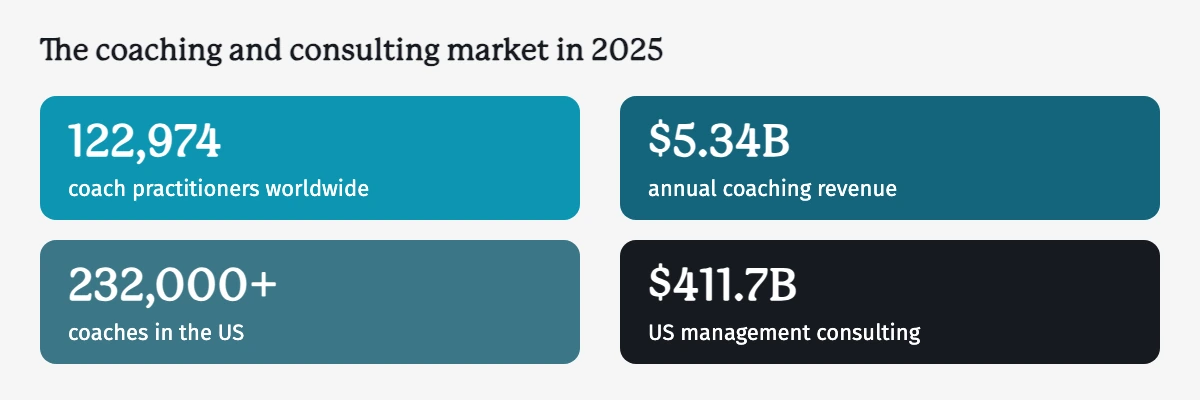
Coach counts and revenue from the International Coaching Federation, "2025 ICF Global Coaching Study Executive Summary," 2025. US consulting market size from IBISWorld, "Management Consulting in the US - Market Size," 2025.
Which Odoo modules does a coaching or consulting practice actually need?
A practice has five jobs to cover, three of them from day one, and Odoo maps a module to each one without bolt-ons. Across small firms the appetite is clear: almost 60% of US small businesses now use AI for business operations, more than double the 2023 baseline (U.S. Chamber of Commerce, 2025). The same firms want fewer tools doing more.
Here is the practical mapping. Each row is a job a practice does every week and the Odoo module that handles it.
| The job | Odoo module | What it covers for this practice |
|---|---|---|
| Win and track relationships | CRM | Leads from email, web, and calls; a visible pipeline; follow-up activities so nobody slips through |
| Quote and get paid | Sales + Invoicing (+ Sign) | Quote to online accept to e-signature to invoice; Invoicing ships in the free Community edition |
| Deliver the engagement | Project + Timesheets + Invoicing | Tasks and milestones, billable time logged against the client and drawn into invoices, a native client Portal to share progress |
| Schedule sessions (optional) | Calendar + Appointments | Self-service booking, pay-before-you-confirm, email and SMS reminders, Outlook and Gmail sync |
| Stay in front of your audience (optional) | Email Marketing | Segmented lists, templates, A/B tests, campaign KPIs tied back to the CRM |
| Productize your knowledge (optional) | eLearning | Sell courses with video, PDF, and quizzes; payment before enrollment; certificates on completion |
What a coaching or consulting practice needs, and the Odoo module for each jobThe jobOdoo moduleWhat it covers for this practiceWin and track relationshipsCRMLeads from email, web, and calls; a visible pipeline; follow-up activities so nobody slips throughQuote and get paidSales + Invoicing (+ Sign)Quote to online accept to e-signature to invoice; Invoicing ships in the free Community editionDeliver the engagementProject + TimesheetsTasks and milestones, billable time logged against the client, a native client Portal to share progressSchedule sessionsCalendar + AppointmentsSelf-service booking, pay-before-you-confirm, email and SMS reminders, Outlook and Gmail syncStay in front of your audienceEmail MarketingSegmented lists, templates, A/B tests, campaign KPIs tied back to the CRMProductize your knowledge (optional)eLearningSell courses with video, PDF, and quizzes; payment before enrollment; certificates on completion
| Path | License cost | The real trade-off |
|---|---|---|
| Community (self-hosted) | Free | You host, maintain, and upgrade it yourself; no Studio, no full Accounting, no official support |
| One App Free (hosted) | Free | Exactly one app; a multi-module practice tips to a paid plan on the second app |
| Paid hosted plan | Per user, per month | Hosting, support, and the full app suite are covered; check current rates before you commit |
The flow ties them together. A lead lands in CRM, you qualify it, a Sales quote goes out, the client e-signs, a project spins up with time tracking, and invoicing draws on billable hours. One worth flagging: Odoo's client Portal is native. Clients can log in, see their tasks, and message you, so you do not need a separate portal tool.
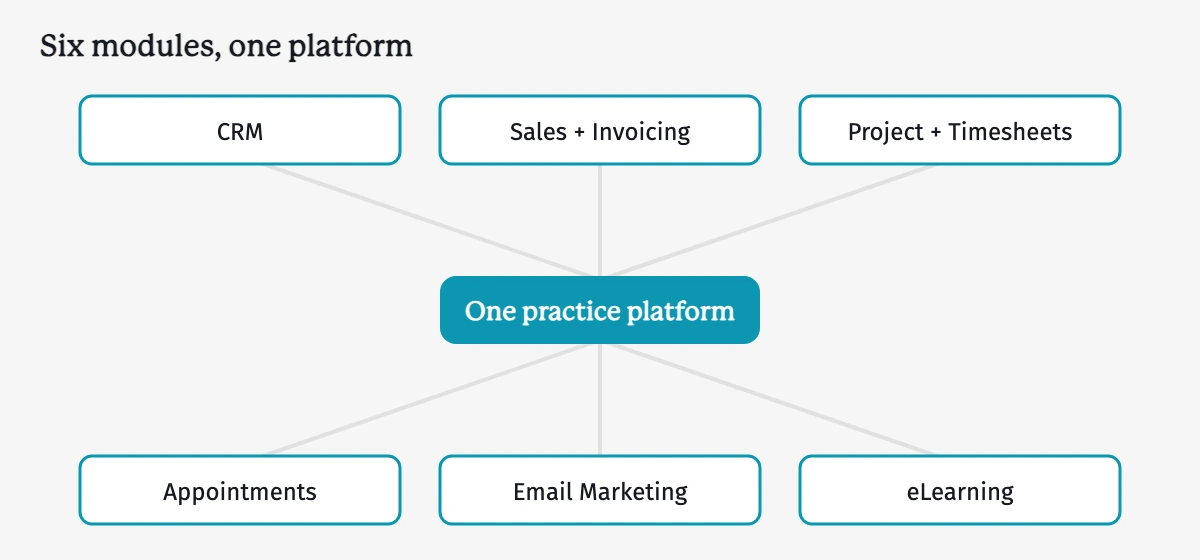
A lead lands in CRM, a Sales quote goes out and is e-signed, a Project spins up with billable time, and Invoicing draws on those hours, all on one platform. Source: Knowlix module mapping, 2026.
Where does Odoo fall short for a coaching practice?
Odoo covers the business side well, from CRM through Invoicing, and there is one notable gap on the coaching side: it has no built-in session-tracking. That distinction is the whole answer here. The modules that run the practice are strong, while the specialized coaching log is absent and has to be added. Awareness of these trade-offs matters more as adoption climbs and expectations rise, with 88% of organizations now using AI in at least one function, up from 78% the year before (McKinsey, 2025). Buyers expect their software to do the specialized job too, not only the back office. The two trade-offs below set the right expectations: a session-tracking gap you fill with an add-on, and a short learning curve that costs decision time rather than money.
Odoo has no native place to log session notes, homework, or client progress over time. Purpose-built coaching tools carry that out of the box. In Odoo you fill the gap with a paid third-party module, such as Probuse's Life / Career / Business Coaching Management at around €178 (Odoo Apps Store, v19.0), or a custom build. Either route adds a small upgrade-maintenance burden, since add-ons and customizations can need attention when Odoo ships a new version.
If session-tracking is the core of how you coach, weigh that honestly. A purpose-built coaching platform may serve that one job better, so it is worth comparing one against Odoo for that specific need. Odoo's strength is running the whole business around the coaching. The specialized session log stays a separate job.
A second point sets expectations rather than naming a flaw. Odoo's breadth means a short learning curve for a non-technical owner. The cost is decision time during setup, not money. Knowing the modules in advance, as mapped above, removes most of that friction.
Course-led practices usually land on Kajabi first. Our Kajabi alternatives comparison works through what it covers and where it stops.
Is Odoo really free for a small practice?
Odoo Community is genuinely free to license, with a catch worth understanding before you build on it. The license costs nothing, while hosting, maintenance, and upgrades become your job, so the real cost moves from a bill to your own hours. Cost pressure is real for small firms, which lose an estimated 24 days a year to financial admin, and 63% expect AI to ease that load (Sage, 2025). Software that frees nothing on that front, while quietly costing you weeks elsewhere, is not the bargain it looks like. The three paths below, Community self-hosted, the hosted "One App Free" tier, and a paid hosted plan, each trade money for time differently, and a coaching practice that runs several modules will usually land on a paid plan once the second app goes live.
Odoo's free Community edition can run a coaching business: CRM, Sales, Invoicing, Appointments, and Project are all available. The trade-off is that you self-host it, self-maintain it, and self-upgrade it. You give up Odoo Online and Odoo.sh hosting, the Studio customization tool, full Accounting, and official support. For a non-technical owner, that DIY burden is the real price.
Odoo's hosted "One App Free" plan is a separate offer, and it covers exactly one app. A practice needs several modules working together, so a real setup tips into the paid plan on the second app. The honest summary: truly free means self-hosted Community with the maintenance work on you.
The three Odoo cost paths for a small practicePathLicense costThe real trade-offCommunity (self-hosted)FreeYou host, maintain, and upgrade it yourself; no Studio, no full Accounting, no official supportOne App Free (hosted)FreeExactly one app; a multi-module practice tips to a paid plan on the second appPaid hosted planPer user, per monthHosting, support, and the full app suite are covered; check current rates before you commit
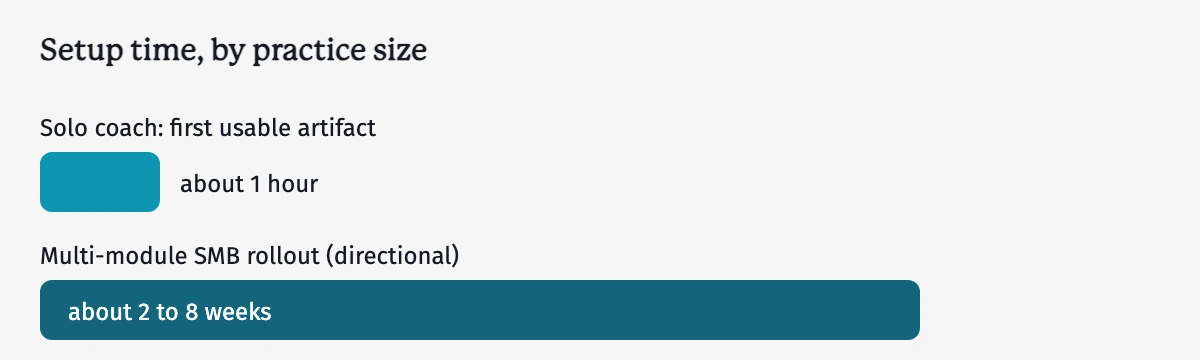
Directional benchmarks, not fixed quotes. A multi-module timeline depends on how many modules go live at once and how much you customize. Source: Knowlix expert handover, 2026.
How long does Odoo take to set up?
Less time than the "ERP equals months" reputation suggests, especially if you build it module by module. The pull toward production AI is strongest among the smallest firms catching up: 8.8% of small firms (under 250 staff) used AI to produce their goods or services by August 2025, up from 6.3% (U.S. SBA Office of Advocacy, 2025). Setup speed is what lets a small team join them.
A solo coach can reach a first usable artifact in about an hour. Start with CRM, let Sales auto-create when you close the first deal, then add Appointments, Project, and Invoicing as you need them. You expand the system as the practice grows rather than configuring everything before day one.
A five-person consultancy takes longer because of shared setup. You add users, agree on pipeline stages, and set one timesheet-and-billing policy everyone follows. As a directional benchmark, a multi-module SMB rollout runs from a couple of weeks to a couple of months, depending on how many modules go live at once and how much you customize.
Where Knowlix fits for coaches and consultants
Disclosure first: Knowlix is our own product, so read this as the interested party that it is.
Here is the direct version. For a coaching or consulting practice with no IT person, Knowlix is the fastest way onto this stack. The base setup takes roughly 5 to 10 minutes: tax regulations, currency, accounting and legal requirements are configured automatically, according to your location. From that base, Knowlix scaffolds more than the five jobs above. It builds an integrated website where discovery-call inquiries land in the CRM as leads, a storefront where coaching programs are ready to sell with Stripe and invoicing already wired in, and events and self-paced courses you can publish when the practice needs them. You get the five-job flow plus the storefront around it, all in plain language. You can watch a two-minute walkthrough of a coaching business set up on Knowlix.
One mechanism makes that possible: Knowlix is an AI layer on Odoo 19 Community, hosted, with zero customizations, and it writes directly to the Odoo database. An inquiry becomes a CRM lead, a qualified lead becomes a quote you review before it sends to the client, an accepted quote spins up a project with time tracking, and invoicing draws on billable hours. Nothing irreversible happens without your sign-off: a quote or invoice is never sent until you approve it, and each user sees only what their permissions allow. Because Knowlix reads your live data, you can ask across your whole book of business, such as which clients have not booked a follow-up or what you invoiced this quarter. A general chatbot has no link to your records and cannot answer that.
Start on a 7-day free trial at $24.90 per user per month (Knowlix pricing), or see how the setup works on the Knowlix Odoo Partner page.
Where Knowlix is not the answer: if session-tracking is the core of how you coach, a purpose-built platform may serve that one job better, and if you run a large custom Odoo build with your own developers, you may prefer that control. For the broader picture of putting AI on Odoo, see how to add AI to Odoo.


Frequently asked questions


Yes. Odoo covers the core jobs of a coaching practice on one platform: CRM for leads, Sales and Invoicing to quote and get paid, Appointments for self-service booking, and Project with Timesheets to deliver and bill the work. Invoicing ships in the free Community edition, and the client Portal is native, so a separate portal tool is not needed. That single-platform reach is the draw for owners who lose time to scattered admin. Entrepreneurs spend 36% of the work week on administrative tasks (Time etc, "The Real Cost of Admin," Censuswide survey of 251 US business owners, 2023, https://www.timeetc.com/resources/how-to-achieve-more/the-big-price-of-small-tasks-how-entrepreneurs-may-be-unwittingly-keeping-their-businesses-small, retrieved 2026-06-26), and for a practice billing by the hour that is the most expensive unbilled line. The one real gap is session-tracking, which Odoo does not do natively. You fill it with a paid third-party module or a custom build.
Yes, the client Portal is native to Odoo. Clients can log in to see their project tasks, follow progress, and message you, so a separate portal tool is not required. The Portal comes with the Project app rather than as a paid extra, which is one reason a coaching practice can stay on a single platform instead of stitching together six tools. That consolidation matters as software expectations rise across small firms: almost 60% of US small businesses now use AI for business operations, more than double the 2023 baseline (U.S. Chamber of Commerce and Teneo Research, "Empowering Small Business: The Impact of Technology on U.S. Small Business," 2025, https://www.uschamber.com/technology/empowering-small-business-the-impact-of-technology-on-u-s-small-business, retrieved 2026-06-26). Because the Portal reads the same Odoo records you work in, clients see live project status rather than a separate, out-of-date copy.
The Community edition is free to license and can run a practice, but you host, maintain, and upgrade it yourself, without Studio, full Accounting, or official support. For a non-technical owner, that do-it-yourself burden is the real price of "free." The hosted "One App Free" plan covers only one app, and a multi-module practice tips into a paid plan on the second app. Weigh that against the admin cost free software is meant to cut: small firms lose an estimated 24 days a year to financial admin, and 63% expect AI to ease that load (Sage, "Small Business, Big Opportunity," 2025, https://www.sage.com/en-gb/company/digital-newsroom/2025/05/09/the-hidden-admin-burden-on-small-businesses/, retrieved 2026-06-26). Truly free, then, means self-hosted Community with the maintenance work on you. A hosted paid plan covers hosting, support, and the full app suite, so check current rates before you commit.
Most consulting practices need CRM, Sales with Invoicing, and Project with Timesheets for billable time. Appointments handles self-service scheduling, and Email Marketing keeps your audience warm with segmented lists tied back to the CRM. The practical advice is to start with CRM and Invoicing, then add Appointments and Project as the book of business grows, since buying the whole suite up front is the most common over-purchase. The market behind this is large: US management consulting is a $411.7 billion market in 2026, made up mostly of small firms (IBISWorld, "Management Consulting in the US - Market Size," 2026, https://www.ibisworld.com/united-states/market-size/management-consulting/1421/, retrieved 2026-06-26). Those small firms sell their time, so the modules that protect billable hours come first, and the optional ones, like eLearning, wait until there is a reason to turn them on.
Not natively. Odoo has no built-in place to log session notes, homework, or client progress over time, which is the one notable gap on the coaching side. You can fill it with a paid third-party module, such as Probuse's Life / Career / Business Coaching Management at around €178, or commission a custom build. Either route adds a small upgrade-maintenance burden, because add-ons can need attention when Odoo ships a new version. This trade-off matters more as adoption climbs and buyers expect software to do the specialized job too: 88% of organizations now use AI in at least one function, up from 78% the year before (McKinsey, "The State of AI in 2025," survey of 1,993 respondents, 2025, https://www.mckinsey.com/capabilities/quantumblack/our-insights/the-state-of-ai, retrieved 2026-06-26). If session-tracking is the core of how you coach, weigh a purpose-built platform for that one job honestly. Odoo's strength is running the whole business around the coaching.
A solo coach can reach a first usable artifact in about an hour by starting with CRM, letting Sales auto-create on the first closed deal, then adding Appointments, Project, and Invoicing as needed. You expand the system as the practice grows rather than configuring everything before day one. A small multi-person consultancy takes longer, from a couple of weeks to a couple of months, depending on how many modules launch at once and how much customization is involved, mostly because of shared decisions on users, pipeline stages, and one billing policy. Setup speed is what lets small teams adopt this kind of software at all: 8.8% of small firms used AI to produce their goods or services by August 2025, up from 6.3% (U.S. SBA Office of Advocacy, "AI in Business: Small Firms Closing In," 2025, https://advocacy.sba.gov/2025/09/24/ai-in-business-small-firms-closing-in/, retrieved 2026-06-26).
Subscribe for Our Newsletter
Book your call below.


Check your website health score
Scan your site in seconds and make sure you're beating your competitors.
