
What Is an AI Layer for Odoo?

- An AI layer sits on top of Odoo, reads its data, and carries out tasks by writing back to the database under your permissions.
- The test of a real one: it writes to the database instead of only writing about it.
- Four checks: database writes, user permissions, confirmation gates before irreversible actions, and cross-app context.
- Odoo’s native assistant reads and displays; custom agents can write once you build and permission them yourself.
- Knowlix ships those agents, prompts, and guardrails preconfigured, plug-and-play.
Disclosure: Knowlix is an AI-native business platform built on the Odoo backbone, and an official Odoo Partner. Knowlix is itself an AI layer for Odoo, so this article has a commercial interest. We define the category first on its merits, then say where Knowlix fits. Knowlix GmbH, founded 2021, Munich. Last verified 2026-06-25.
Short answer: An AI layer is software that sits on top of Odoo, reads its data, and carries out tasks by writing back to the database under your permissions. The test of a real one: it writes to the database instead of only writing about it.
For daily admin work, the test is whether the layer finishes the task. The Knowlix AI Teammate drafts invoices, updates project plans from incoming email, and turns notes into tasks, each one a record inside Odoo. It waits for your approval before anything goes out. An instance with every module installed is ready in about 2 minutes, over 80% less setup time than configuring Odoo by hand.
For the practical setup options, see our companion guide on how to add AI to Odoo. This article defines the category.
AI layer for Odoo, defined
In software, an AI layer is a component you add to an existing system that can read that system’s data and act on it. For Odoo, that means software that sits on top of your ERP, reads its data, understands the business context, and executes tasks by writing back to the database through permissioned actions. It does not replace the ERP. The ERP stays the system of record, and the layer adds a way to act on it in plain language.
Four parts carry the definition, and each one is testable:
Some layers extend the same idea to setup: you describe what you need in plain language, and the layer configures the system for you.
That last clause is the one that separates a layer from a chatbot. Reading and answering is useful. Acting on the data, safely, is the point.
Knowlix is one example of this category, used as a concrete reference point later in this article.
Why does “AI layer” mean different things to different vendors?
Be careful with the phrase, because the market has not settled it. Some vendors use “AI layer” for a read-only assistant that explains and recommends and never touches the database. Others use it for a system that takes action and writes records. The two meanings are opposites, and the gap between them is exactly the thing a buyer needs to check.
This matters because the demand is real and growing. In 2025, 58% of US small businesses reported using generative AI, up from 40% in 2024 (U.S. Chamber of Commerce and Teneo Research, 2025). Production use inside the business runs earlier: 8.8% of small firms reported using AI to make their goods or services by August 2025 (U.S. SBA Office of Advocacy, 2025). When a category is in demand and undefined at the same time, the label gets attached to very different products. A definition you can test protects you from that.
How does an AI layer differ from native Odoo AI, ChatGPT, and a new ERP?
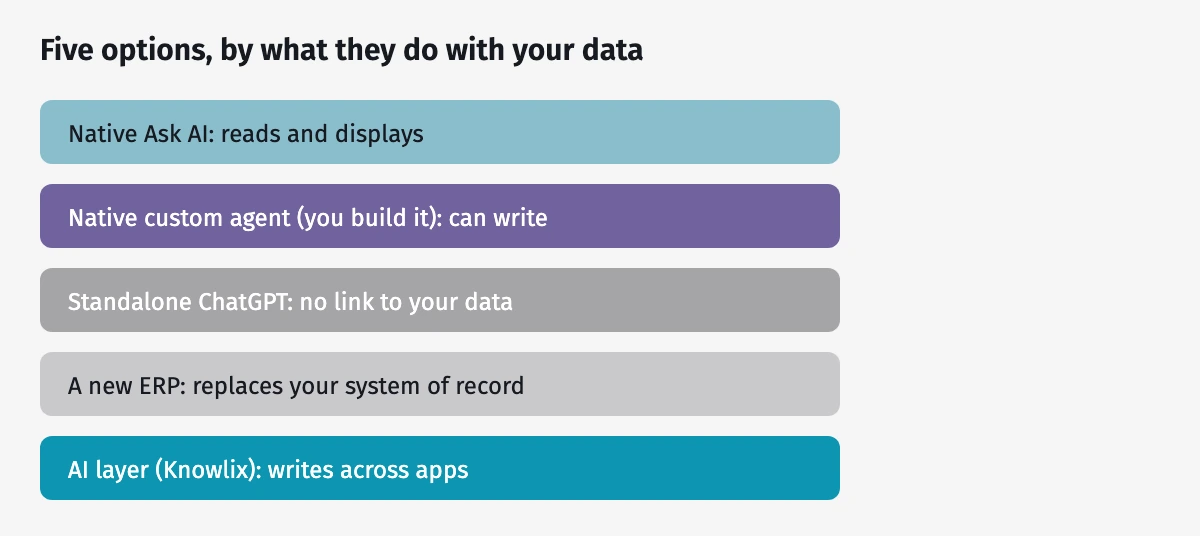
An AI layer is one of several ways to bring AI near your Odoo data, and it has a specific job the alternatives do not cover. The figure and table below set the five options side by side, using the same five labels in both.
| Option | What it does | The limit |
|---|---|---|
| Native Ask AI (Odoo 19) | Default assistant on Gemini or OpenAI, which you choose. Drafts, summarizes, answers, and opens views. | Reads and displays; it does not create or alter records. |
| Native custom agent (Odoo 19) | An agent you build and permission to take actions in Odoo. | You design, build, and permission each one yourself. |
| Standalone ChatGPT | General drafting and reasoning in a separate window. | No link to your data. It does not know your company and does not store business records in a structured, retrievable way. |
| A new ERP | Could do everything a layer does, with AI built in. | Switching ERPs is a migration project. You replace your system of record instead of adding to it. |
| An AI layer | Reads your live Odoo data and writes back across apps, in plain language, under permission. | It depends on the ERP underneath. It adds action, without adding a second database. |
Of the five options, only an AI layer writes across your Odoo apps under permission. Native Ask AI reads and displays, a native custom agent can write once you build it, standalone ChatGPT has no link to your data, and a new ERP would replace your system of record.
One fact is worth stating plainly, because stale claims circulate: Odoo’s native AI runs on Gemini or OpenAI, selectable per agent (Odoo documentation). There is no native Anthropic Claude option. The default assistant, per Odoo’s own docs, “can open views and display reports, but it cannot create leads or alter data” (Odoo documentation). That read-only default is precisely the boundary an AI layer is built to cross.
How do you tell a real AI layer from a buzzword?
Test any “AI layer for Odoo” against four checkable criteria. If it fails the write and permission tests, it is an assistant or an insight tool, which is fine, though it does not act on the data the way a layer does.
| Criterion | What a real layer does | The buzzword tell |
|---|---|---|
| Writes to the database | Creates and updates real Odoo records: leads, quotes, invoices | “Insights and chat only”; cannot create or change data |
| Respects user permissions | Shows and touches only what the logged-in user is allowed to see | Ignores Odoo access rights, or runs on one all-powerful account |
| Gates irreversible actions | Never sends an invoice or quote, and never deletes data, without explicit confirmation | Fires irreversible actions on its own, with no human step |
| Works across apps | Carries context from a sale to what you then bill | A single-screen assistant with no awareness beyond one module |
One more differentiator sits outside the table: dedicated Odoo knowledge. A generic bridge, such as an MCP server, can connect an AI model to your database, but it arrives knowing nothing about how Odoo works. A real layer ships with that knowledge built in: which module owns which record, how a lead becomes a quote, and what a write is allowed to touch.
These criteria are also a cost-control checklist, and the data says that matters. Gartner predicts that more than 40% of agentic AI projects will be canceled by the end of 2027, citing escalating costs, unclear value, and inadequate controls (Gartner, 2025). Permissions and confirmation gates are the controls that keep a project on the surviving side of that line.
Who needs an AI layer, and who does not?
An AI layer fits a specific shape of business, and it is honest to say where it does not. It suits a 5-to-50-person company that already runs Odoo, has no dedicated IT team, and wants AI to carry out everyday work rather than only answer questions. For that owner, the value is action across the business without a build project.
It is a weaker fit for a company with its own development team running large, custom Odoo builds. That team can assemble native custom agents and wire their own tools, and they may prefer the control of doing so. The trend still points toward agents in business software either way: Gartner projects that up to 40% of enterprise applications will include task-specific AI agents by 2026, up from less than 5% in 2025 (Gartner, 2025). The question for most small businesses is whether to build that capability or adopt it.
Where Knowlix fits
Disclosure first: Knowlix is our example of an AI layer, so read this as the interested party that it is.
Measured against the four criteria above, here is the direct version. Knowlix sits on top of Odoo Community, hosted, and writes directly to the Odoo database: it creates and updates leads, quotes, and CRM records, and it carries context across apps, so a confirmed sale can flow into what you bill. It runs behind permission gates, so it never sends an invoice or a quote, and never deletes data, without an explicit confirmation, and it shows each user only what their rights allow. It makes zero customizations, which keeps it upgrade-safe as Odoo ships new versions. In the go-lives we run, the permission gate is the setting owners ask about first.
Compared with native custom agents, where you write the prompts and set the guardrails yourself, Knowlix ships plug-and-play: the agents, prompts, and guardrails come preconfigured. If your team has limited AI knowledge in-house, that is the difference that decides it. Configuration works the same way. You describe what you need in plain language, and Knowlix sets the system up accordingly, with its Odoo knowledge already built in.
In daily use that looks like this. You type, “draft the quote for the deal we just won and send it once I confirm,” and Knowlix reads the open opportunity, creates the quote in Odoo Sales, and waits for your confirmation before it sends. That write step, under permission, is the line that separates a real AI layer from an assistant.
That is the category as the four criteria define it, stated plainly. For the step-by-step of putting AI on an Odoo instance, including the native and App Store routes, see how to add AI to Odoo. Start on a 7-day free trial at $24.90 per user per month (Knowlix pricing), or see how a managed setup works on the Knowlix Odoo Partner page. For a broader view of what these systems do day to day, see our ERP system examples.


Frequently asked questions


In any ERP, an AI layer is a component on top of the system that reads its data and acts on it through permissioned writes. The ERP stays the system of record, and the layer adds natural-language action across modules like CRM, Sales, and Invoicing.
It is software that sits on top of your ERP, reads your data, and does tasks for you by writing back to the system in plain language. It adds action to the tool you already use, rather than replacing it.
No. Odoo's default assistant reads and displays data, while an AI layer writes to the database and works across apps. You can build native custom agents that write, though you configure and permission each one yourself. In practice, native AI answers and shows, and a layer also takes the action for you.
No. It sits on top of the ERP you already run, which stays your system of record. The layer adds a way to act on that data.
No. Odoo's native AI runs on Google Gemini or OpenAI, and you select the model per agent. Anthropic Claude is reachable only through third-party modules or your own integration.
Check four things: it writes to the database, it respects user permissions, it asks before irreversible actions, and it works across apps. If it only answers questions, it is an assistant. A layer also takes the action, and that write step is the one buyers most often find missing.
Subscribe for Our Newsletter
Book your call below.


Check your website health score
Scan your site in seconds and make sure you're beating your competitors.
