
AI That Automates Admin Work: What Actually Works in 2026

In 2026, AI reliably takes over the templated, high-volume side of admin: invoice creation and chasing, appointment scheduling, email triage and drafting, CRM data entry after calls, expense categorization, proposal drafting, meeting notes with action items, and reporting over your own data. Each of those works because the task has clear success criteria and the AI has structured access to the system that holds the data. The pattern is the same every time: AI drafts or executes the routine 80%, a human approves anything that leaves the building. Autonomous multi-step work across screens the AI does not control still fails often, and legally you own whatever your AI sends.
Disclosure: Knowlix builds one of the product categories described below, an AI Teammate that does this kind of back-office work inside the apps it ships with, so read our section as the interested party it is. Every statistic carries a source with its retrieval date, the caveats are stated honestly, and the real limits of our own product are named. All vendor data comes from public pages, last verified 2026-07-10.
Last updated: 2026-07-10
The admin tasks AI reliably takes over in 2026 are the repetitive, templated, high-volume ones: creating and chasing invoices, booking appointments, triaging and drafting email, logging CRM records after calls, categorizing expenses, drafting proposals, turning meeting audio into action items, and pulling reports from your own numbers. What still needs you is the judgment work: exceptions, relationships, and anything unsupervised where a mistake costs real money. In a Carnegie Mellon benchmark of open-ended office tasks, the best AI agent finished only 24% of them on its own (Carnegie Mellon University School of Computer Science, TheAgentCompany). The useful question is which specific tasks AI handles, how well, and where you still check its work. This guide walks through the eight workflows one at a time, with the workload behind each and the honest caveat.
How much admin work is there to automate?
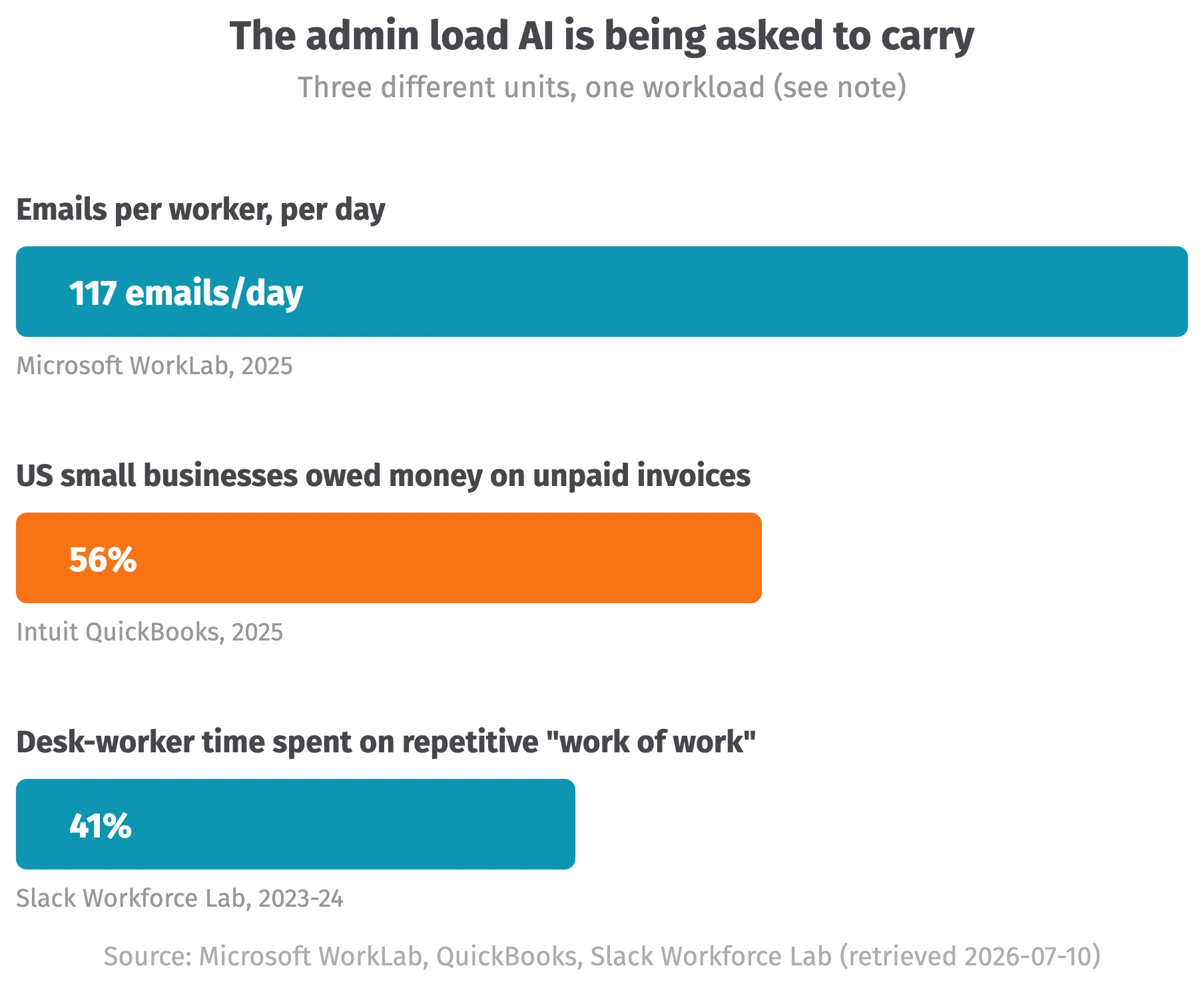
A lot, and email leads it. The average worker now receives 117 emails a day, most skimmed in under a minute, and gets interrupted every two minutes during core hours (Microsoft WorkLab, Breaking Down the Infinite Workday). Getting paid is the other big drain: 56% of US small businesses are owed money on unpaid invoices, averaging $17.5K per business, and 47% have invoices overdue by 30 days or more (Intuit QuickBooks, 2025 US Small Business Late Payments Report). Zoom out and the picture holds across the desk: desk workers spend 41% of their time on low-value, repetitive "work of work" (Slack Workforce Lab). That 41% is the pool this article is about, and most of it lives in the same handful of tasks.
Which admin tasks can AI actually take over?
| Workflow | What AI reliably does | Watch out for |
|---|---|---|
| Invoice creation + chasing | Generates invoices from project data, sends scheduled reminders, flags overdue accounts | Reminder tone; verify amounts before send |
| Appointment scheduling | Books against live availability, resolves time zones, reschedules conflicts | Preference exceptions need explicit setup |
| Email triage + follow-ups | Classifies by urgency, summarizes threads, drafts replies in your voice | Autonomous sending; you own what it sends |
| CRM data entry after calls | Transcribes, extracts fields, logs to the record automatically | Wrong-contact matching; consent laws |
| Expense categorization | Auto-categorizes bank-feed transactions, OCRs and matches receipts | Silent miscategorization until tax time |
| Proposal / quote drafting | Drafts from a template plus deal data, adapts scope language | Hallucinated scope and pricing |
| Meeting notes to action items | Records, transcribes, extracts owners and deadlines, pushes tasks | Recording consent; auto-share defaults |
| Report generation | Answers questions over your own data, summarizes KPIs on schedule | Fabrication when asked to invent, not query |
Eight admin workflows AI can take on in 2026, what it reliably does, and the caveat for each (tool categories, not brands)
Eight workflows carry most of the admin work, and the pattern repeats in each: AI handles the templated 80%, a person approves anything that leaves the building. The table below is the short version; the sections under it add the caveat for each.
Can AI create and chase invoices?
This is one of the clearest wins. AI generates invoices from your time and project data, sends escalating reminders on a schedule, and flags accounts that slip past due. Given that 56% of US small businesses are owed money on unpaid invoices (Intuit QuickBooks, "2025 US Small Business Late Payments Report", 2025), that is real time back, and the reason is structural: an invoice ledger has clean fields and a clear success state, so the AI never has to guess. We run our own invoice reminders through the same kind of automation, and the review step still catches an edge case most months, usually a credit or a part-payment the schedule did not know about. The caveat is tone and accuracy: an unreviewed reminder can bruise a client relationship, and the amount has to be right before it goes out. The full walkthrough lives in our guide on how to chase unpaid invoices with AI.
Can AI schedule appointments?
Scheduling is the most reliable piece of admin work to automate here, because it is a constraint-solving problem with a clean answer. AI books against your live calendar, resolves time zones, defends focus blocks, and reshuffles conflicts when they come up. It works well because the success criteria are unambiguous: the slot is free or it is not. The part to set up is your exceptions. A rule like "never book me Fridays with new clients" has to be told to the system; it will not infer your preferences on its own. One second-order caveat: the external guest still lands on a booking page, and that step is rules, not AI, so treat the intelligence as living on your side of the calendar, with the guest simply picking a slot. This is why scheduling clears the bar the open-ended benchmarks trip over: there is nothing to improvise, only a set of hard constraints to satisfy, and the AI either satisfies them or shows you it cannot.
Can AI triage and draft email?
Email is the biggest single drain at 117 messages a day (Microsoft WorkLab, "Breaking Down the Infinite Workday", 2025), and AI handles the reading half well. It sorts by urgency, summarizes long threads, drafts replies in your voice, and queues follow-up reminders. Draft quality in 2026 is genuinely good, good enough that the summary of a long thread is often more useful than the thread. Where it breaks is autonomous sending. Agents fail roughly 70% of multi-step office tasks in independent testing (The Register, AI agents fail a lot), and you are on the hook for whatever your AI sends under your name. Keep it drafting for your approval: the reading half saves the time, the sending half carries the risk, so let the AI own the first and keep the second yourself.
Can AI update the CRM after calls?
This is a mature, high-volume win. A call recorder transcribes the conversation, pulls out the fields that matter (next step, budget, objections), and writes them to the right record automatically. It matters because sales reps spend less than 30% of their time actually selling; the rest goes to admin and data entry (Salesforce, State of Sales). Logging after the call is exactly the kind of task that never gets done well by hand, because it competes with the next call. The risk is quiet: a wrong-contact match or a garbled field poisons the record without anyone noticing, so spot-check weekly. Recording-consent laws also apply, and a poisoned record is worse than an empty one, since the whole point of the CRM is that the next person trusts what is written there.
Can AI categorize expenses?
Reliably, and the honest framing is that most of this predates the current AI wave. Bank-feed transactions get auto-categorized by machine learning, and receipts are read by OCR and matched to charges. It is well-proven and low-drama, which is worth saying plainly, because "AI" here is mostly mature pattern-matching, the kind that has run in accounting software for years. The caveat is that a miscategorization compounds silently right up until tax season, so a human review at month-end is not optional. Older process research put a single expense report at 20 minutes and $58 to handle, with 19% containing errors (GBTA Foundation); the tooling has moved on since, but the review discipline has not changed, and the errors that slip through are usually the boring ones a person would have caught in seconds.
Can AI draft proposals and quotes?
This saves the most on first drafts. AI pulls from a template plus your CRM deal data, adapts the scope language to the client, and hands you a draft in minutes, turning the worst part of proposal writing, the blank page, into an editing job. The failure mode is expensive, though: a hallucinated scope item or a wrong price in a quote is a contract problem. Every number and every line of scope gets a human check before the quote leaves your outbox. Treat the draft as a starting point you are responsible for. The mechanism that makes drafting fast, filling gaps with plausible language, is the same mechanism that invents a line item nobody agreed to, which is why the read-through before send earns its keep here more than anywhere else in this list.
Can AI turn meetings into action items?
Meeting notes are the most mature genAI admin category. The tool records, transcribes, summarizes, extracts owners and deadlines, and pushes tasks straight into your project tool. The reason it works is that the raw material, spoken words, is already the data, so there is no system for the AI to navigate and no interface to get lost in. The caveats are about consent and defaults. Some states require all-party consent to record, a point now in active litigation over a notetaking service (NPR), and reporting on that case describes auto-share settings emailing a transcript to outsiders after participants thought the call had ended. Check who is on the recording and where the summary goes before you switch it on. The attribution errors are the subtler trap: the tool can assign an action item to the wrong person, and a task quietly landing on the wrong plate is the kind of mistake that only surfaces when the deadline is missed.
Can AI generate reports?
Reliably, when it works from your own numbers. AI answers plain-language questions over your data and summarizes KPIs on a schedule with high accuracy. Fabricated figures and quotes creep in once it is asked to generate narrative from nothing. US financial regulator FINRA now names hallucination as a formal oversight risk in its 2026 report, telling firms to keep humans monitoring model outputs (FINRA, 2026 Annual Regulatory Oversight Report; see also CFO Dive, "Deloitte AI debacle seen as wake-up call for corporate finance", 2025). The rule to hold onto: every number in an AI report should trace back to a record you already have. The practical test before you trust a report is simple: ask where each number came from, and if the answer is a source you can open, the AI was querying your data and not composing new figures.
Notice the thread through all eight. Every piece of admin work AI does well is one where it has structured access to the system that holds the data. Every caveat is about the moment it has to improvise. That distinction comes back below.
What can go wrong when AI automates admin work?
Three real cases mark the boundary. First, fabrication: Deloitte Australia refunded the final instalment on a A$440K (about US$290K) government report after it was found to contain AI-invented academic references and a made-up federal-court quote (Fortune, Deloitte was caught using AI in $290,000 report; contract value per Accounting Times, Deloitte to refund government after using AI in $440k report). Hallucination is built into how these models work; no future update makes it go away.
Second, liability. A Canadian tribunal held Air Canada responsible after its website chatbot invented a refund policy, and it rejected the argument that the bot was a separate entity (CBC). The precedent applies directly to admin: an email, quote, or invoice your AI sends is legally your output.
Third, consent. Four class actions against a notetaking service were consolidated in 2025 over recording conversations without all-party consent, and reporting on the case describes a transcript of confidential post-meeting talk being auto-emailed after participants thought the call had ended (NPR, Otter.ai faces class action lawsuit over transcription). Set consent and auto-share deliberately. Then the fix for all three is the same review loop the workflows above already call for.
Why does AI do better inside one system than across ten?
Because most agent failures happen in navigation: a pop-up it could not dismiss, a person it could not reach. In the Carnegie Mellon benchmark, the best agent finished 24% of open-ended tasks, and the stumbles were mundane: it could not dismiss a pop-up, or failed to reach the right person and renamed someone else to stand in (Carnegie Mellon University School of Computer Science, "TheAgentCompany", 2025). When the AI has clean, structured access to the record it needs, that whole class of error disappears.
The sprawl makes it worse. The average company now runs 101 apps (Okta, Businesses at Work 2025), and larger organizations manage 305 SaaS applications on average (Zylo, 2026 SaaS Management Index). Okta and Zylo measure much larger organizations than a typical small business, and the direction holds at small scale: every extra disconnected tool is another interface an agent has to navigate, one more place for it to get lost.
The more of your admin work sits in one system the AI can read and write directly, the more of the eight workflows above it can actually finish without a human bailing it out. That is the practical case for keeping the system of record in one place.
Is there a single tool for CRM, invoicing and project management?
Knowlix is an all-in-one AI Business Platform that runs CRM, invoicing and project management on one set of records, replacing 50+ apps with a single login. The point is not the module count but the shared data underneath: the customer in the CRM, the project against that customer and the invoice for that project are the same record, so nothing is re-keyed or reconciled between tools.
Two consequences follow. First, margin becomes visible per job, because hours, quoted value and invoice status sit together instead of in three exports. Second, an AI Teammate can act across all of it, drafting the client update and the overdue reminder in one pass.
For example, a project running twelve hours past its quote surfaces as a margin flag, a drafted client note and an invoice adjustment, prepared for one approval. The instance is ready in 2 minutes at $24.90 per seat per month, reduced from $35.60.
Where does an AI Teammate fit in?
An AI Teammate is AI that runs the admin work inside the business apps it ships with, instead of sitting on top of your stack and answering questions about it. Our read of that evidence: structured access to the system of record removes the failure class CMU documented. The benchmark tested agents on external tools only, so treat this as reasoning, and note this is our own product category.
Knowlix is an all-in-one AI Business Platform for small businesses. Its AI Teammate drafts and sends invoices, chases the unpaid ones, and updates records after conversations, all inside the CRM, invoicing, and projects it bundles (per our product page, knowlix.ai). Pricing is a flat $24.90/user/mo, with a 7-day trial (per our pricing page, knowlix.ai/pricing). The honest limits: it is a young product with a small third-party review footprint, and it is the wrong pick if what you need is a governed multi-model chat workspace for a thousand-plus employees.
If you want the wider setup, the platform overview for small business covers it, and the question of what one of these costs against a hire lives in our AI employee for small business guide. You can start the 7-day trial at knowlix.ai with no card.


Frequently asked questions


AI reliably automates invoice creation and chasing, appointment scheduling, email triage and drafting, CRM data entry after calls, expense categorization, proposal drafting, meeting notes with action items, and reporting over your own data. Each works best when the task is templated and the AI has direct access to the system holding the data.
It can, but autonomous sending is where AI is least safe. Draft quality is good in 2026, yet you are legally responsible for what your AI sends under your name (per the Air Canada ruling, 2024). Keep invoices and emails on a draft-for-approval setting, with the final send in your hands.
Do not let AI send anything unreviewed that leaves your business: quotes, invoices, client emails, and reports. Independent testing found agents fail roughly 70% of multi-step office tasks (The Register, 2025). Keep a human approval step on anything that touches money, contracts, or customers.
It ranges widely. General AI assistants typically start around $20 a month per user, while an AI platform that runs the work inside your business apps, such as our own Knowlix, is $24.90 per user per month with a 7-day no-card trial. Compare that to the specific routine work you would hand it.
Pick one narrow, repetitive task with clear success criteria, such as invoice chasing or CRM updates after calls. Trial a tool that executes that task inside your systems, keep a human approval step, confirm it leaves an audit trail, then expand to the next workflow.
Subscribe for Our Newsletter
Book your call below.


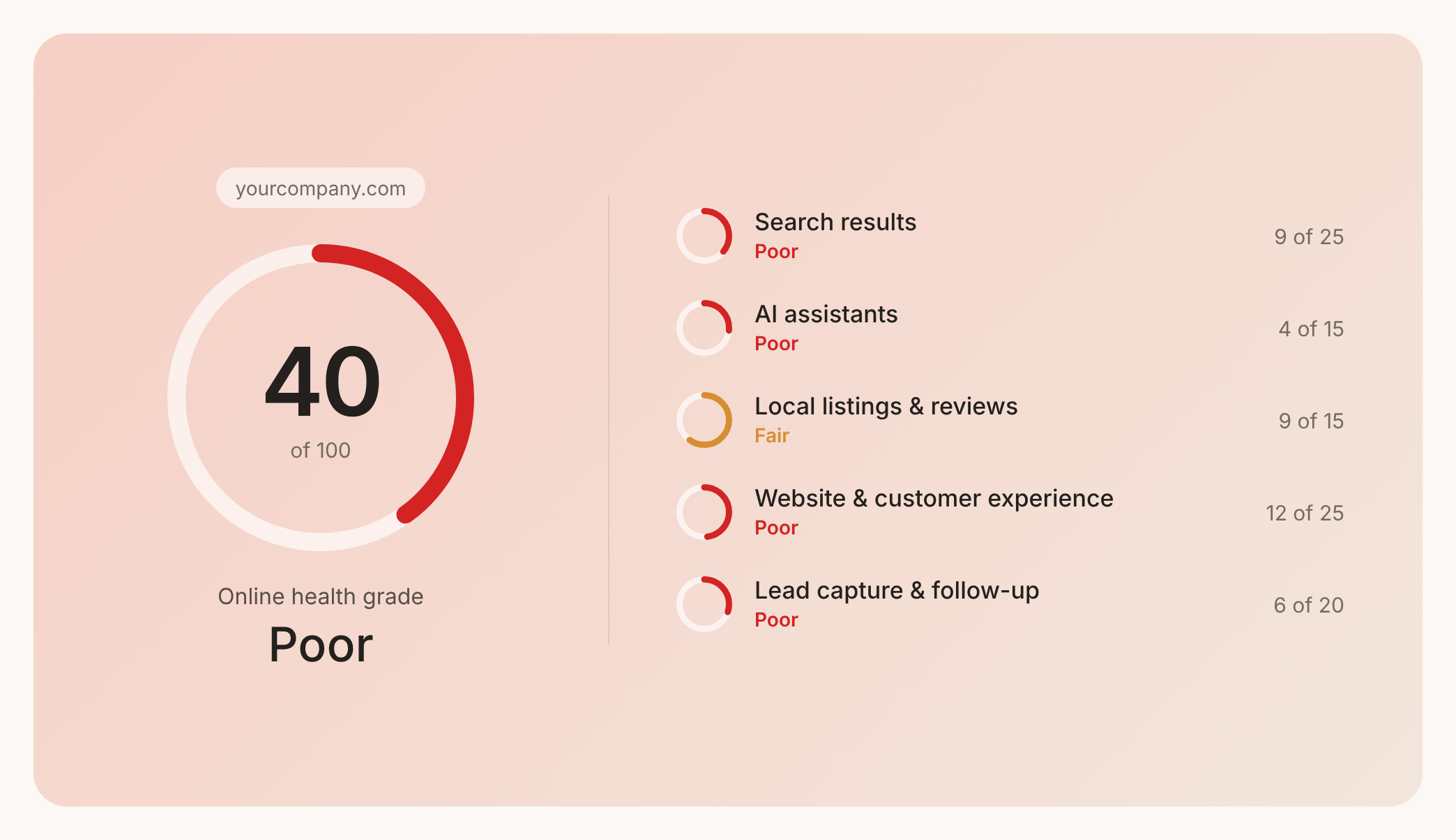

Check your website health score
Scan your site in seconds and make sure you're beating your competitors.
